

레슨 15: 일일 활동 요약 보내기
Gato GraphQL을 WP-Cron과 통합하여 관리 작업을 수행하는 GraphQL 쿼리의 실행을 일정한 시간 간격으로 자동화할 수 있습니다. (Automation 확장 기능이 필요합니다.)
이 튜토리얼 레슨에서는 WP-Cron을 설정하여 24시간마다 사이트에 추가된 새 댓글의 수를 가져오는 GraphQL 쿼리를 실행하고, 해당 통계를 지정된 이메일 계정으로 전송합니다.
새 댓글의 일일 통계를 포함한 GraphQL 쿼리
이 GraphQL 쿼리는 여러 기간에 걸쳐 사이트에 추가된 새 댓글의 수를 나타내는 이메일을 전송합니다:
- 지난 24시간 이내
- 지난 1년 이내
- 이번 달 초부터
- 올해 초부터
슬러그 "daily-stats-by-email-number-of-comments"로 다음 내용의 Persisted Query를 생성합니다:
query CountComments {
DATE_ISO8601: _env(name: DATE_ISO8601) @remove
timeToday: _time
dateToday: _date(format: $__DATE_ISO8601, timestamp: $__timeToday)
timeYesterday: _intSubtract(subtract: 86400, from: $__timeToday)
dateYesterday: _date(format: $__DATE_ISO8601, timestamp: $__timeYesterday)
time1YearAgo: _intSubtract(subtract: 31536000, from: $__timeToday)
date1YearAgo: _date(format: $__DATE_ISO8601, timestamp: $__time1YearAgo)
timeBegOfThisMonth: _makeTime(hour: 0, minute: 0, second: 0, day: 1)
dateBegOfThisMonth: _date(format: $__DATE_ISO8601, timestamp: $__timeBegOfThisMonth)
timeBegOfThisYear: _makeTime(hour: 0, minute: 0, second: 0, month: 1, day: 1)
dateBegOfThisYear: _date(format: $__DATE_ISO8601, timestamp: $__timeBegOfThisYear)
commentsAddedInLast24Hs: commentCount(filter: { dateQuery: { after: $__dateYesterday } } )
@export(as: "commentsAddedInLast24Hs")
commentsAddedInLast1Year: commentCount(filter: { dateQuery: { after: $__date1YearAgo } } )
@export(as: "commentsAddedInLast1Year")
commentsAddedSinceBegOfThisMonth: commentCount(filter: { dateQuery: { after: $__dateBegOfThisMonth } } )
@export(as: "commentsAddedSinceBegOfThisMonth")
commentsAddedSinceBegOfThisYear: commentCount(filter: { dateQuery: { after: $__dateBegOfThisYear } } )
@export(as: "commentsAddedSinceBegOfThisYear")
}
query CreateEmailMessage @depends(on: "CountComments") {
emailMessageTemplate: _strConvertMarkdownToHTML(
text: """
This is the number of comments added to the site:
| Period | # Comments added |
| --- | --- |
| **In the last 24 hs**: | {$commentsAddedInLast24Hs} |
| **In the last 365 days**: | {$commentsAddedInLast1Year} |
| **Since begginning of this month**: | {$commentsAddedSinceBegOfThisMonth} |
| **Since begginning of this year**: | {$commentsAddedSinceBegOfThisYear} |
"""
)
emailMessage: _strReplaceMultiple(
search: [
"{$commentsAddedInLast24Hs}",
"{$commentsAddedInLast1Year}",
"{$commentsAddedSinceBegOfThisMonth}",
"{$commentsAddedSinceBegOfThisYear}"
],
replaceWith: [
$commentsAddedInLast24Hs,
$commentsAddedInLast1Year,
$commentsAddedSinceBegOfThisMonth,
$commentsAddedSinceBegOfThisYear
],
in: $__emailMessageTemplate
)
@export(as: "emailMessage")
}
mutation SendDailyStatsByEmailNumberOfComments(
$to: [String!]!
)
@depends(on: "CreateEmailMessage")
{
_sendEmail(
input: {
to: $to
subject: "Daily stats: Number of new comments"
messageAs: {
html: $emailMessage
}
}
) {
status
}
}WP-Cron을 통한 GraphQL 쿼리 실행 예약
WP-Cron 이벤트를 예약하여 Gato GraphQL 훅 gatographql__execute_persisted_query를 실행하고, 이메일을 전송할 주소를 인수로 전달하며 반복 주기(매일)를 설정해야 합니다.
이는 PHP로 수행합니다:
wp_schedule_event(
time(),
'daily',
'gatographql__execute_persisted_query',
[
'daily-stats-by-email-number-of-comments',
[
'to' => ['admin@mysite.com']
],
'SendDailyStatsByEmailNumberOfComments',
1 // This is the admin user's ID
]
);또는 WP-Crontrol 플러그인을 통해 수행합니다:
- Event type: Standard cron event
- Hook name:
gatographql__execute_persisted_query - Arguments:
["daily-stats-by-email-number-of-comments",{"to":["admin@mysite.com"]},"SendDailyStatsByEmailNumberOfComments",1] - Recurrence: Once Daily
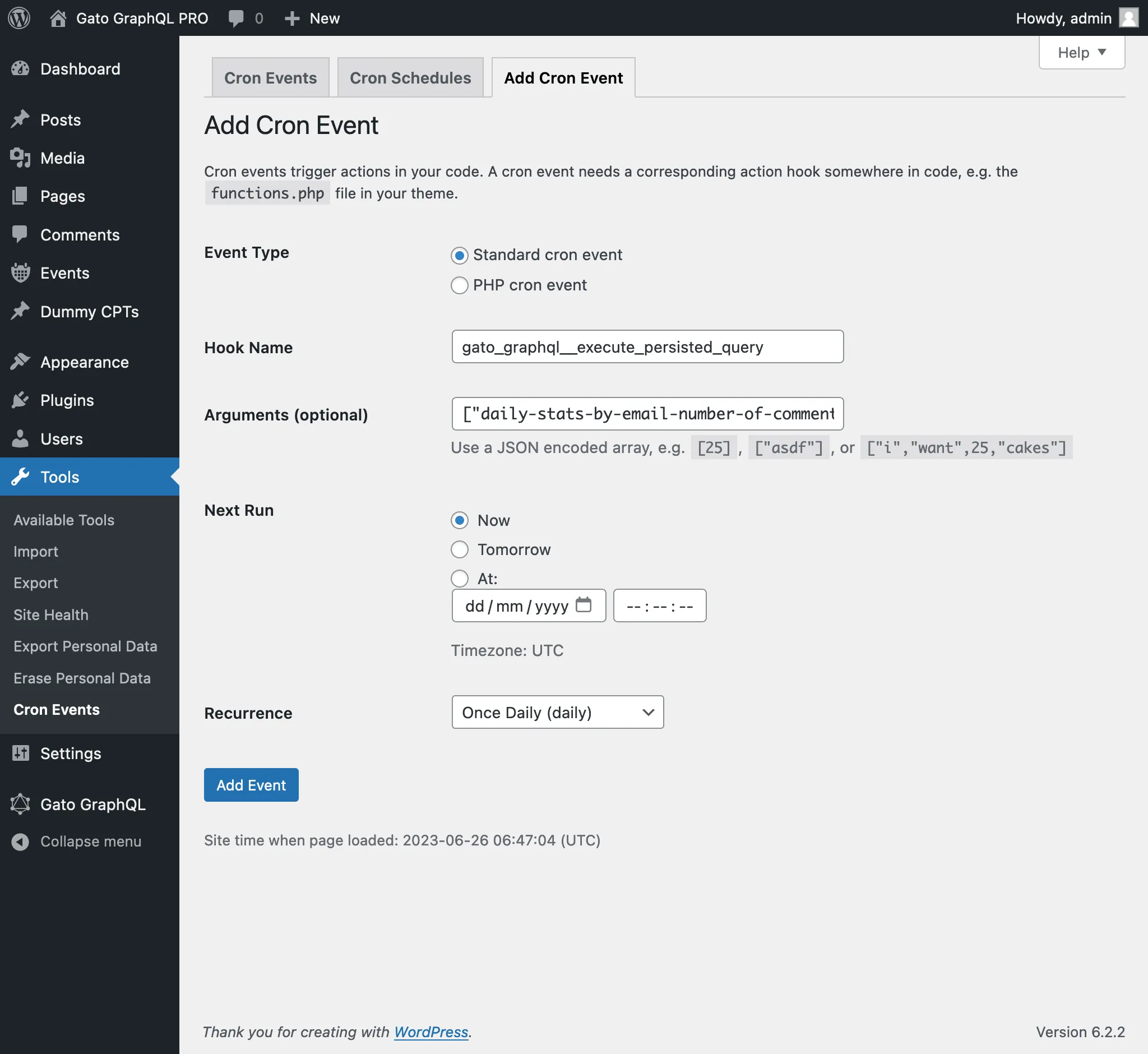
WP-Cron 이벤트에 전달되는 네 번째 인수는 GraphQL 쿼리를 실행할 때 로그인되어 있어야 하는 사용자의 ID(정수로)또는 사용자 이름(문자열로)입니다.
(이 경우, 값 1은 관리자 사용자의 ID이며, 사용자 이름 "admin"을 제공할 수도 있었습니다.)
이 인수를 전달하는 것은 일반적으로 mutation을 실행할 때 필요합니다. 이러한 mutation의 대부분은 (적절한 권한을 가진) 사용자가 로그인되어 있어야 하기 때문입니다.