

작업 자동화
사이트에서 어떤 이벤트가 발생했을 때 GraphQL Persisted Query를 자동으로 실행합니다.
WordPress 에디터에서 직접 자동화를 만들 수 있습니다. 자동화 트리거는 임의의 WordPress 액션 훅이며, 액션은 GraphQL Persisted Query의 실행입니다.
모든 자동화 규칙에 접근하기
플러그인 메뉴에서 "Automation Rules"를 클릭하면 생성된 자동화 규칙 목록이 표시됩니다.
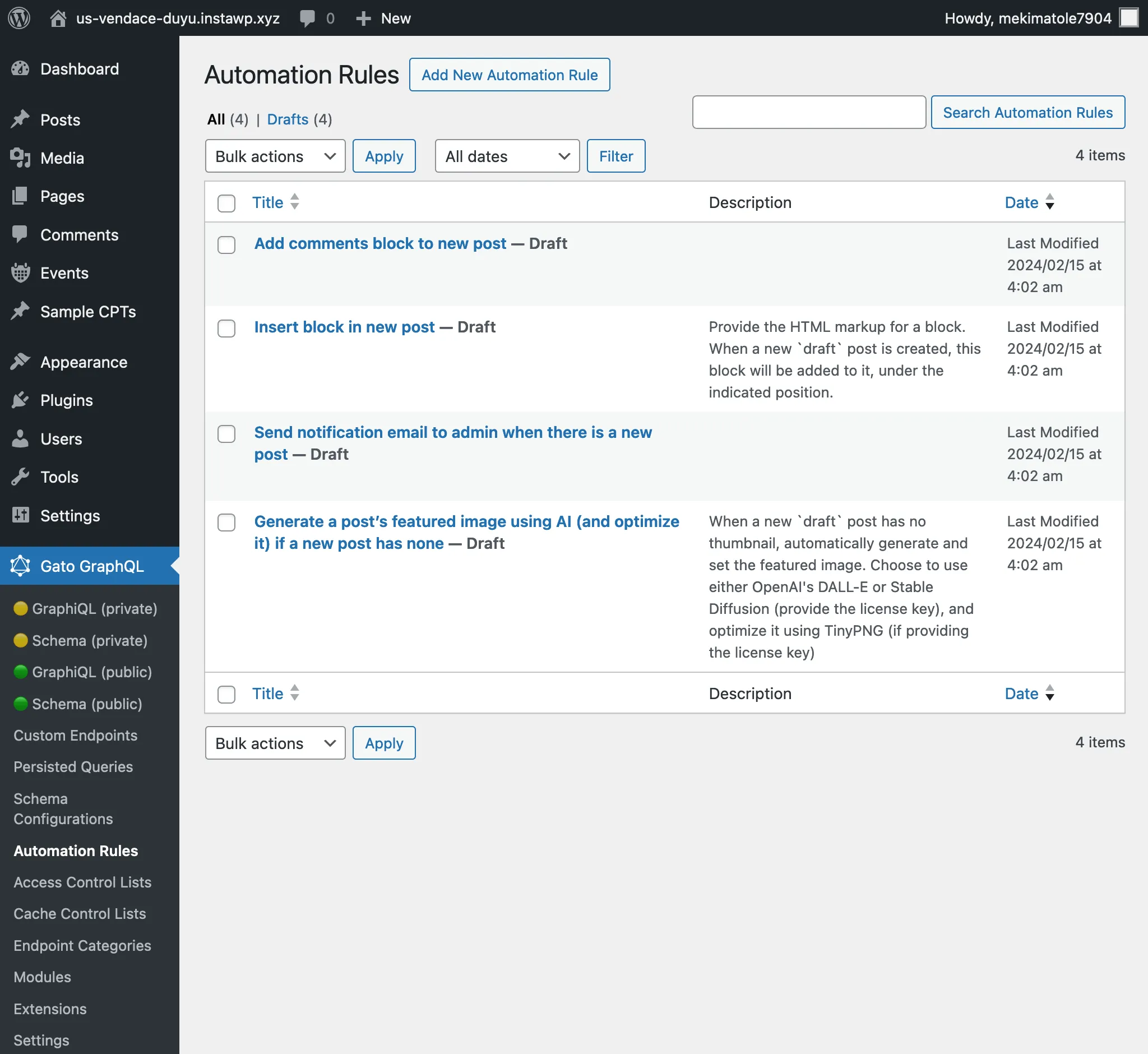
새 자동화 규칙 만들기
"Add New Automation Rule"을 클릭하여 새 항목을 추가합니다.
에디터 화면에서는 다음 항목을 설정해야 합니다.
- 자동화 트리거
- 자동화 액션
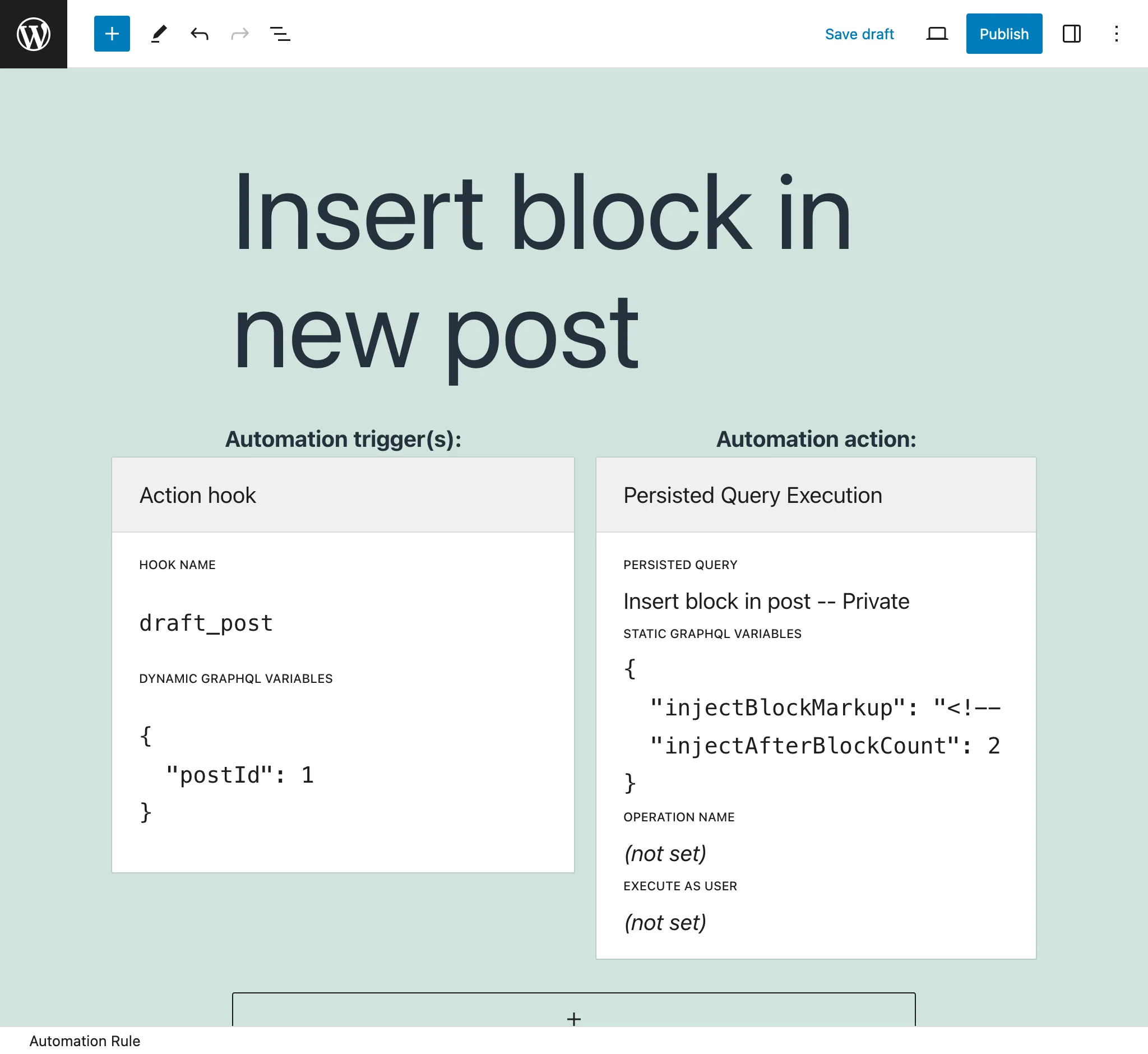
자동화 액션
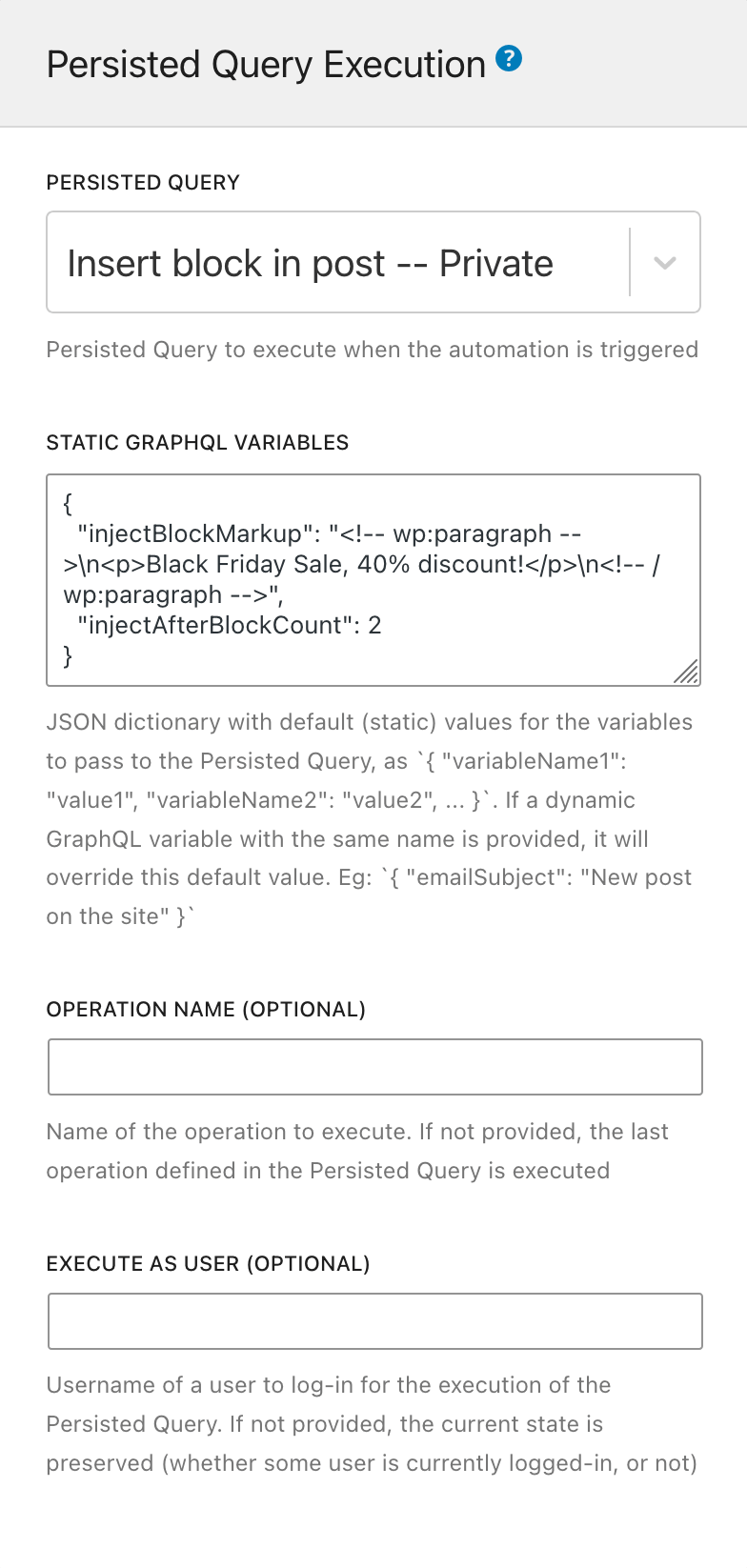
자동화 액션은 어떤 GraphQL Persisted Query를 실행할지를 지정합니다.
이 항목을 다음 요소로 설정합니다.
Persisted Query: 실행할 GraphQL Persisted Query를 선택합니다(상태가 publish 또는 private인 항목 중에서 선택)
Static GraphQL Variables: Persisted Query 내의 GraphQL 변수에 값을 제공하는 JSON 문자열을 지정합니다. 이는 정적 값입니다.
예시:
{
"emailSubject": "New post on the site"
}이 값들은 "동적" GraphQL 변수에 의해 재정의됩니다(아래의 자동화 트리거 참조).
Operation name(선택 사항): Persisted Query에 여러 오퍼레이션이 포함된 경우, 실행할 오퍼레이션을 지정할 수 있습니다(기본값은 마지막 것).
Execute as user(선택 사항): 사용자 슬러그를 지정하여 특정 사용자로 로그인한 상태에서 GraphQL Persisted Query를 실행합니다.
자동화 트리거
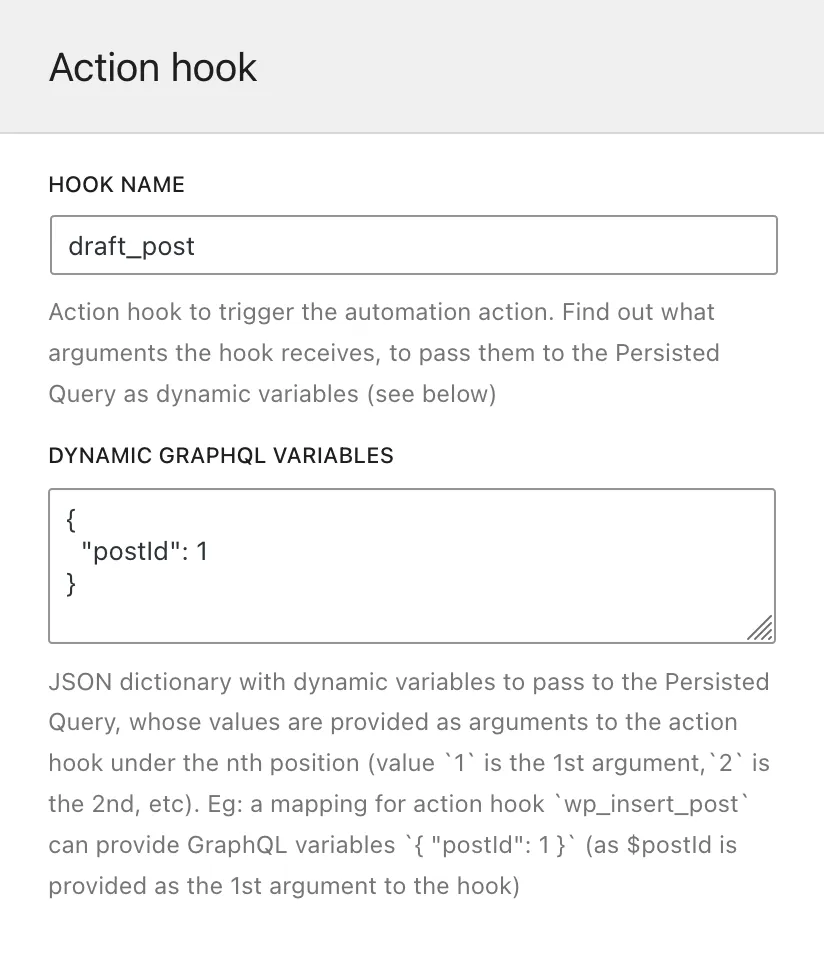
자동화 트리거는 어떤 WordPress 액션 훅이 Persisted Query의 실행을 트리거할지를 지정합니다. 여러 개를 지정할 수도 있습니다(예: 게시물 또는 페이지 편집에만 반응하려면 edit_post_post와 edit_post_page 훅을 모두 지정할 수 있습니다).
이 항목을 다음 요소로 설정합니다.
Hook name: WordPress 액션 훅의 이름.
Dynamic GraphQL Variables: GraphQL 변수를 훅 함수에 전달된 인수에 매핑하는 JSON 문자열을 지정합니다. 이 동적 값은 런타임에 쿼리에 제공됩니다.
JSON 딕셔너리에는 GraphQL 변수 이름을 키로, 액션 훅의 인수 위치를 값으로 지정해야 합니다.
예를 들어, draft_post 훅(post status transitions 참조)은 첫 번째 인수로 $post_id를 제공합니다. 다음 JSON은 GraphQL 변수 $postID가 훅에 전달된 $post_id의 값을 받는다는 것을 나타냅니다.
{
"postID": 1
}(이 예시에서 1은 "draft_post의 첫 번째 인수의 값"을 의미합니다.)
"동적"과 "정적" GraphQL 변수(위의 자동화 액션 참조)에 동일한 키가 사용된 경우, 동적 값이 우선됩니다.
WordPress 훅 매핑
Automation Configurator에서 직접 사용할 수 없는 WordPress 훅이 있습니다. 이러한 훅은 PHP 객체를 훅을 통해 제공하며, GraphQL 변수로 입력할 수 없기 때문입니다.
Gato GraphQL은 이러한 훅 중 일부를 매핑하고 있습니다. gatographql:을 앞에 붙인 동일한 이름의 새 훅을 트리거하고, 해당 객체 ID를 변수로 전달함으로써 GraphQL 변수로 입력할 수 있도록 합니다.
예를 들어, WordPress 훅 draft_to_publish는 변수로 $post(타입 WP_Post)를 전달합니다. Gato GraphQL은 이 훅을 gatographql:draft_to_publish로 매핑하고, 변수로 $postId(타입 int)를 전달합니다.
다음 표는 매핑된 WordPress 훅 목록입니다.
| WordPress 훅 | Gato GraphQL에 의한 매핑 훅 |
|---|---|
{$old_status}_to_{$new_status} (WP_Post $post 전달) | gatographql:{$old_status}_to_{$new_status} (int $postId, string $postType 전달) |
또한 Gato GraphQL은 일부 WordPress 훅을 훅 이름에 추가 정보를 포함하여 재트리거하여, 특정 이벤트를 더 쉽게 캡처하고 자동화할 수 있도록 합니다.
예를 들어, 메타 값을 생성·수정·삭제하는 훅은 훅 이름에 메타 키를 포함하여 트리거됩니다. 이를 통해 게시물에 대표 이미지가 설정될 때 gatographql:added_post_meta:_thumbnail_id 훅으로 자동화를 트리거할 수 있습니다.
다음은 Gato GraphQL의 추가 훅입니다.
| 소스 WordPress 훅 | 트리거되는 Gato GraphQL 훅 |
|---|---|
{$old_status}_to_{$new_status}( WP_Post $post 전달) | gatographql:any_to_{$new_status}gatographql:{$old_status}_to_anygatographql:{$old_status}_to_{$new_status}:{$post_type}gatographql:any_to_{$new_status}:{$post_type}gatographql:{$old_status}_to_any:{$post_type}(모두 int $postId, string $postType 전달) |
created_term | gatographql:created_term:{$taxonomy} |
set_object_terms | gatographql:set_object_terms:{$taxonomy}gatographql:updated_object_terms:{$taxonomy} (기존 텀과 새 텀 사이에 차이가 있는 경우) |
added_post_meta | gatographql:added_post_meta:{$meta_key}gatographql:added_post_meta:{$post_type}:{$meta_key} (5번째 매개변수로 string $post_type도 전달) |
updated_post_meta | gatographql:updated_post_meta:{$meta_key}gatographql:updated_post_meta:{$post_type}:{$meta_key} (5번째 매개변수로 string $post_type도 전달) |
deleted_post_meta | gatographql:deleted_post_meta:{$meta_key}gatographql:deleted_post_meta:{$post_type}:{$meta_key} (5번째 매개변수로 string $post_type도 전달) |
added_term_meta | gatographql:added_term_meta:{$meta_key}gatographql:added_term_meta:{$taxonomy}:{$meta_key} (5번째 매개변수로 string $taxonomy도 전달) |
updated_term_meta | gatographql:updated_term_meta:{$meta_key}gatographql:updated_term_meta:{$taxonomy}:{$meta_key} (5번째 매개변수로 string $taxonomy도 전달) |
deleted_term_meta | gatographql:deleted_term_meta:{$meta_key}gatographql:deleted_term_meta:{$taxonomy}:{$meta_key} (5번째 매개변수로 string $taxonomy도 전달) |
문제 디버깅
자동화가 실행되지 않은 경우, 자동화 설정이나 Persisted Query 실행에 오류가 있을 수 있습니다.
실행 로그
자세한 내용은 문제 트러블슈팅을 참조하세요.
에러 로그
모든 설정 문제(GraphQL 변수의 JSON 문자열 형식이 잘못되었거나 삭제된 Persisted Query를 참조하는 경우 등)및 실행 오류(예외 발생, GraphQL 쿼리의 errors 항목 등)는 PHP의 error_log 함수로 전송되어 WordPress 에러 로그에 출력됩니다.
이러한 에러 로그에는 문자열 [Gato GraphQL]이 앞에 붙습니다.