

HTTP 클라이언트
웹 서버에 HTTP 요청을 실행하고 응답을 가져오는 필드를 GraphQL 스키마에 추가합니다:
_sendJSONObjectItemHTTPRequest_sendJSONObjectItemHTTPRequests_sendJSONObjectCollectionHTTPRequest_sendJSONObjectCollectionHTTPRequests_sendHTTPRequest_sendHTTPRequests_sendGraphQLHTTPRequest_sendGraphQLHTTPRequests
보안상의 이유로, 연결 가능한 URL은 명시적으로 설정해야 합니다.
필드 목록
다음 필드들이 스키마에 추가됩니다.
_sendJSONObjectItemHTTPRequest
단일 JSON 객체에 대한 (REST) 응답을 가져옵니다.
시그니처: _sendJSONObjectItemHTTPRequest(input: HTTPRequestInput!): JSONObject.
_sendJSONObjectItemHTTPRequests
여러 엔드포인트에서 단일 JSON 객체에 대한 (REST) 응답을 가져옵니다. 비동기(병렬) 또는 동기(순차)로 실행됩니다.
시그니처: _sendJSONObjectItemHTTPRequests(async: Boolean = true, inputs: [HTTPRequestInput!]!): [JSONObject].
_sendJSONObjectCollectionHTTPRequest
JSON 객체 컬렉션에 대한 (REST) 응답을 가져옵니다.
시그니처: _sendJSONObjectCollectionHTTPRequest(input: HTTPRequestInput!): [JSONObject].
_sendJSONObjectCollectionHTTPRequests
여러 엔드포인트에서 JSON 객체 컬렉션에 대한 (REST) 응답을 가져옵니다. 비동기(병렬) 또는 동기(순차)로 실행됩니다.
시그니처: _sendJSONObjectCollectionHTTPRequests(async: Boolean = true, inputs: [HTTPRequestInput!]!): [[JSONObject]].
_sendHTTPRequest
지정된 URL에 연결하고 다음 필드를 포함하는 HTTPResponse 객체를 가져옵니다:
statusCode: Int!contentType: String!body: String!headers: JSONObject!header(name: String!): StringhasHeader(name: String!): Boolean!
시그니처: _sendHTTPRequest(input: HTTPRequestInput!): HTTPResponse.
_sendHTTPRequests
_sendHTTPRequest와 유사하지만 여러 URL을 받아 비동기(병렬)로 연결할 수 있습니다.
시그니처: _sendHTTPRequests(async: Boolean = true, inputs: [HTTPRequestInput!]!): [HTTPResponse].
_sendGraphQLHTTPRequest
제공된 엔드포인트에 대해 GraphQL 쿼리를 실행하고, 응답을 JSON 객체로 가져옵니다.
이 필드의 입력은 GraphQL에 필요한 데이터(엔드포인트, GraphQL 쿼리, 변수 및 작업 이름)를 받으며, 기본 메서드(POST)와 콘텐츠 타입(application/json)이 이미 설정되어 있습니다.
시그니처: _sendGraphQLHTTPRequest(input: GraphQLRequestInput!): JSONObject.
_sendGraphQLHTTPRequests
_sendGraphQLHTTPRequests와 유사하지만 여러 GraphQL 쿼리를 동시에 실행합니다. 비동기(병렬) 또는 동기(순차)로 실행할 수 있습니다.
시그니처: _sendGraphQLHTTPRequests(async: Boolean = true, inputs: [GraphQLRequestInput!]!): JSONObject.
허용 URL 설정
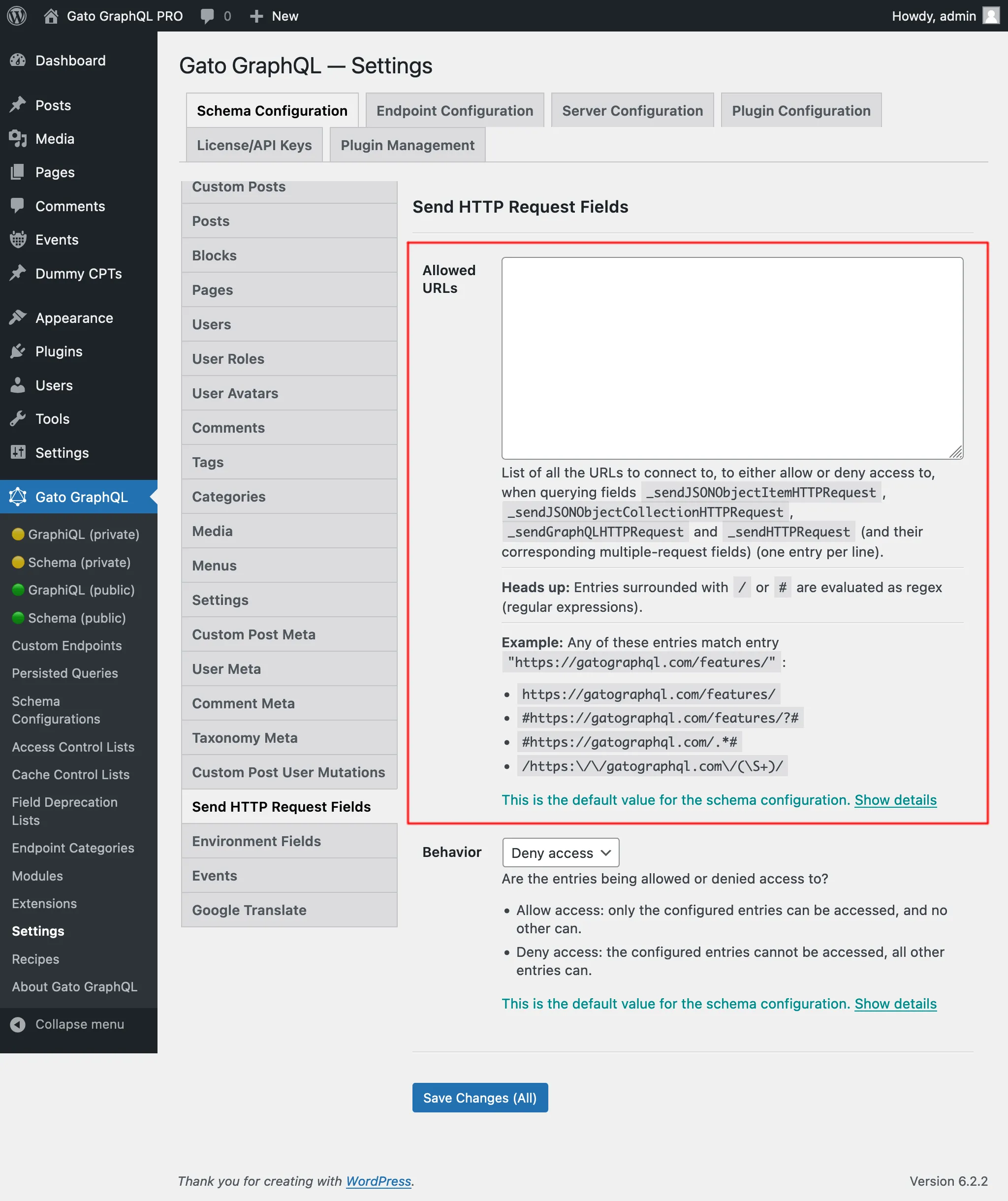
연결 가능한 URL 목록을 설정해야 합니다.
각 항목은 다음 중 하나입니다:
/또는#으로 둘러싸인 경우 정규식(regex)- 그 외의 경우 완전한 URL
예를 들어, 다음 항목들은 모두 URL "https://gatographql.com/recipes/"에 일치합니다:
https://gatographql.com/recipes/#https://gatographql.com/recipes/?##https://gatographql.com/.*#/https:\\/\\/gatographql.com\\/(\S+)/
이 설정은 우선순위 순서대로 두 곳에서 수행할 수 있습니다:
- 커스텀: 해당 스키마 구성에서
- 일반: 설정 페이지에서
엔드포인트에 적용된 스키마 구성에서 "Use custom configuration" 옵션을 선택하고 원하는 항목을 입력합니다:
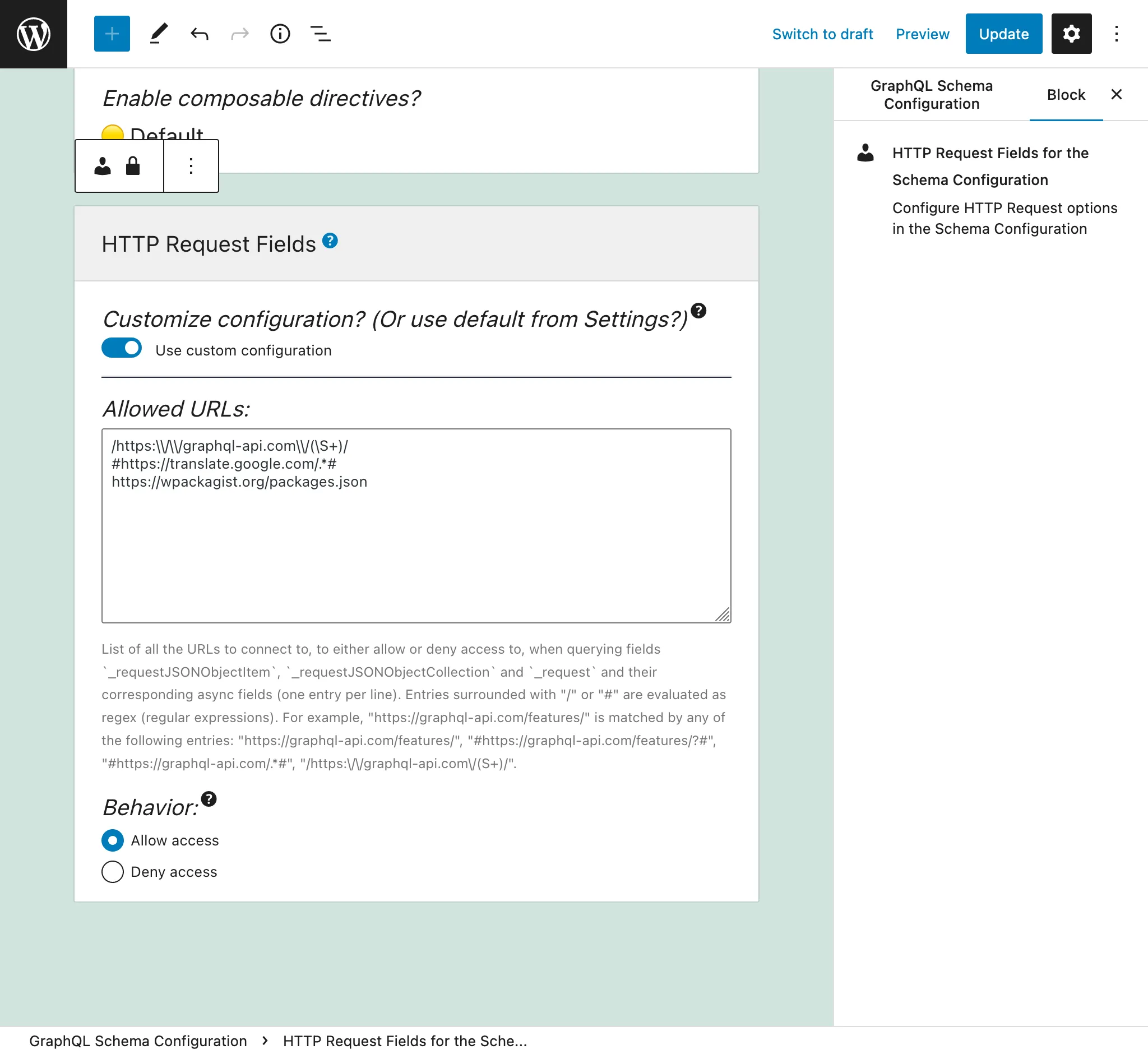
그렇지 않으면 설정의 「Send HTTP Request Fields」 탭에서 정의된 항목이 사용됩니다:
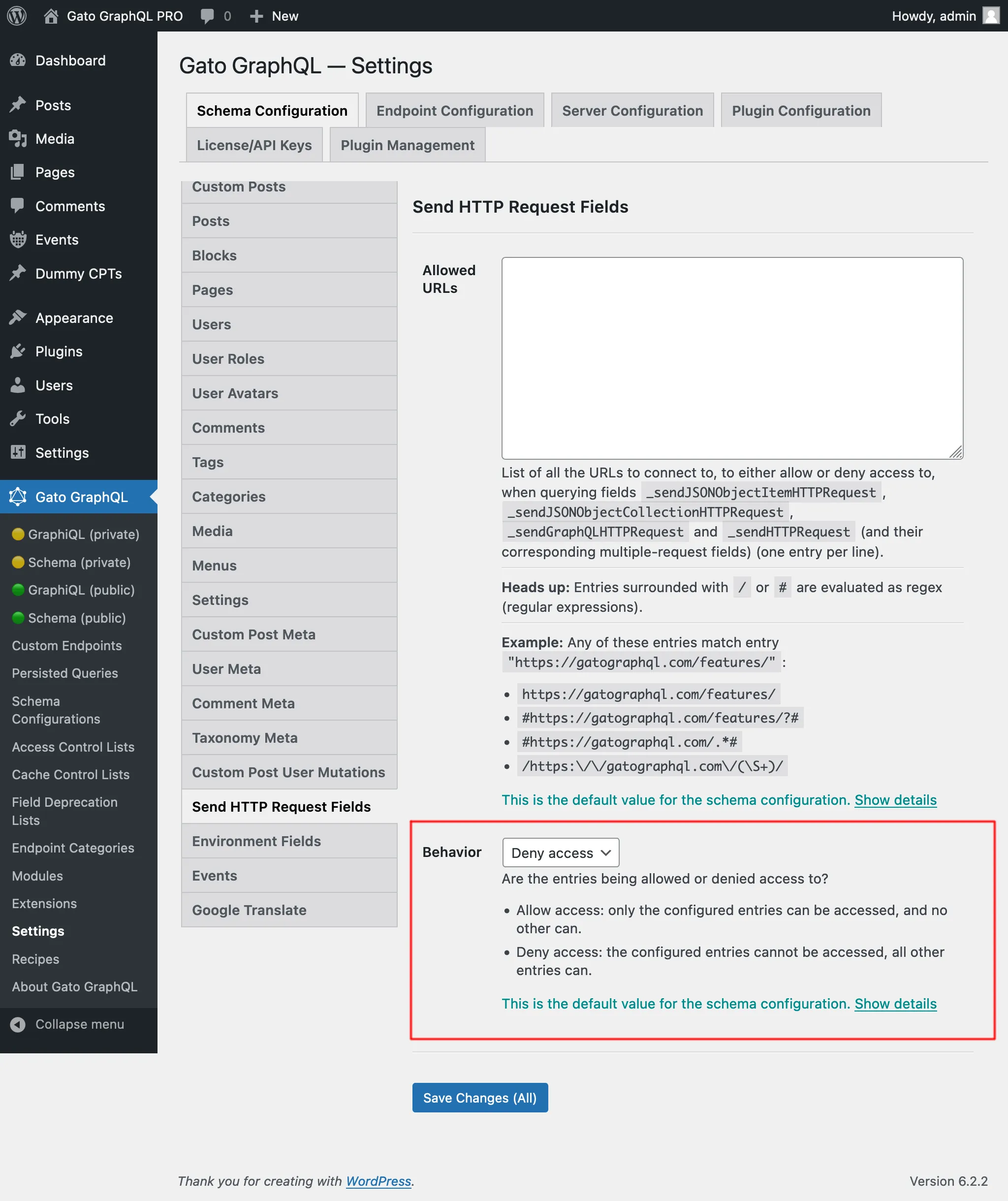
「액세스 허용」과 「액세스 거부」의 두 가지 동작이 있습니다:
- 액세스 허용: 설정된 항목에만 액세스할 수 있으며, 그 외에는 액세스할 수 없습니다
- 액세스 거부: 설정된 항목에는 액세스할 수 없으며, 그 외 모든 항목에는 액세스할 수 있습니다
내부 URL에 액세스하는 데 필요한 권한
일부 URL은 내부 주소(127.0.0.1, 링크-로컬 범위, 클라우드 메타데이터 엔드포인트 등)로 해석되며, 도달 시 내부 서비스가 노출될 수 있습니다. 이 설정은 설정 페이지의 Plugin Configuration > HTTP Client 에서 구성됩니다.
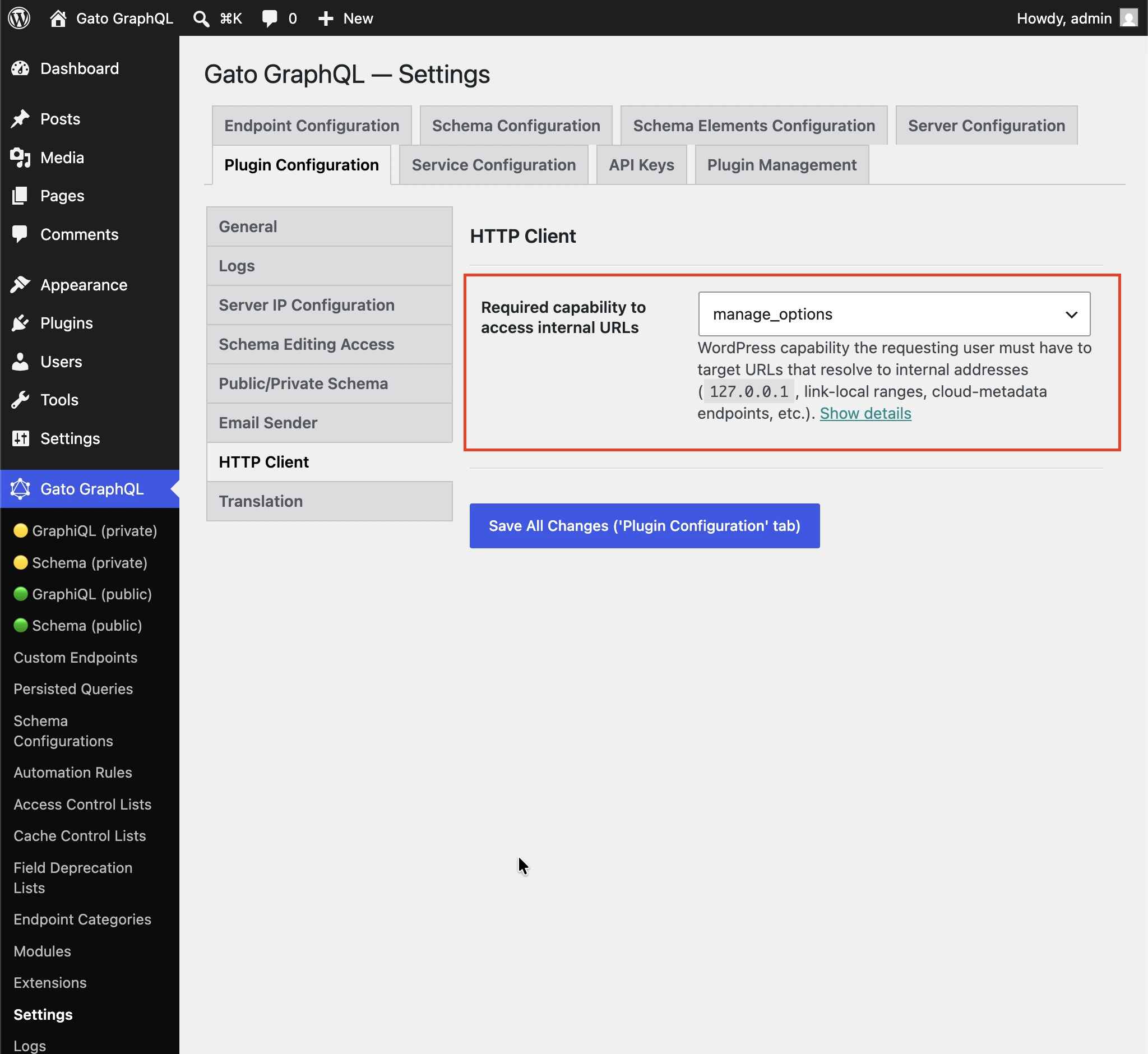
내부 주소(127.0.0.1, 링크-로컬 범위, 클라우드 메타데이터 엔드포인트 등)로 해석되는 URL을 대상으로 하기 위해 요청하는 사용자가 가져야 하는 WordPress 권한입니다.
비관리자 사용자가 HTTP 클라이언트 필드를 통해 내부 서비스에 액세스하지 못하도록 기본값은 manage_options 로 설정되어 있습니다.
권한 확인을 비활성화하려면 (로그인한 모든 사용자) 를 선택하세요.
각 필드의 사용 시기
모든 필드는 유사하지만 각각 다릅니다.
_sendJSONObjectItemHTTPRequest
이 필드는 JSON 객체 항목 하나를 가져옵니다. WP REST API 엔드포인트 /wp-json/wp/v2/posts/1/와 같은 REST 엔드포인트에서 단일 항목을 쿼리할 때 유용합니다.
이 쿼리:
{
postData: _sendJSONObjectItemHTTPRequest(input: { url: "https://newapi.getpop.org/wp-json/wp/v2/posts/1/" } )
}...다음 응답을 가져옵니다:
{
"data": {
"postData": {
"id": 1,
"date": "2019-08-02T07:53:57",
"date_gmt": "2019-08-02T07:53:57",
"guid": {
"rendered": "https:\/\/newapi.getpop.org\/?p=1"
},
"modified": "2021-01-14T13:18:39",
"modified_gmt": "2021-01-14T13:18:39",
"slug": "hello-world",
"status": "publish",
"type": "post",
"link": "https:\/\/newapi.getpop.org\/uncategorized\/hello-world\/",
"title": {
"rendered": "Hello world!"
},
"content": {
"rendered": "\n<p>Welcome to WordPress. This is your first post. Edit or delete it, then start writing!<\/p>\n\n\n\n<p>I’m demonstrating a Youtube video:<\/p>\n\n\n\n<figure class=\"wp-block-embed is-type-video is-provider-youtube wp-block-embed-youtube wp-embed-aspect-16-9 wp-has-aspect-ratio\"><div class=\"wp-block-embed__wrapper\">\n<iframe loading=\"lazy\" title=\"Introduction to the Component-based API by Leonardo Losoviz | JSConf.Asia 2019\" width=\"750\" height=\"422\" src=\"https:\/\/www.youtube.com\/embed\/9pT-q0SSYow?feature=oembed\" frameborder=\"0\" allow=\"accelerometer; autoplay; clipboard-write; encrypted-media; gyroscope; picture-in-picture\" allowfullscreen><\/iframe>\n<\/div><figcaption>This is my presentation in JSConf Asia 2019<\/figcaption><\/figure>\n",
"protected": false
},
"excerpt": {
"rendered": "<p>Welcome to WordPress. This is your first post. Edit or delete it, then start writing! I’m demonstrating a Youtube video:<\/p>\n",
"protected": false
},
"author": 1,
"featured_media": 0,
"comment_status": "closed",
"ping_status": "open",
"sticky": false,
"template": "",
"format": "standard",
"meta": [],
"categories": [
1
],
"tags": [
193,
173
]
}
}
}_sendJSONObjectCollectionHTTPRequest
이 필드는 _sendJSONObjectItemHTTPRequest와 유사하지만, WP REST API 엔드포인트 /wp-json/wp/v2/posts/와 같은 JSON 객체 컬렉션을 가져옵니다.
이 쿼리:
{
postData: _sendJSONObjectItemHTTPRequest(input: { url: "https://newapi.getpop.org/wp-json/wp/v2/posts/?per_page=3&_fields=id,type,title,date" } )
}...다음 응답을 가져옵니다:
{
"data": {
"postData": [
{
"id": 1692,
"date": "2022-04-26T10:10:08",
"type": "post",
"title": {
"rendered": "My Blogroll"
}
},
{
"id": 1657,
"date": "2020-12-21T08:24:18",
"type": "post",
"title": {
"rendered": "A tale of two cities – teaser"
}
},
{
"id": 1499,
"date": "2019-08-08T02:49:36",
"type": "post",
"title": {
"rendered": "COPE with WordPress: Post demo containing plenty of blocks"
}
}
]
}
}_sendHTTPRequest
이 필드는 응답의 모든 속성을 포함하는 HTTPResponse 객체를 가져옵니다. 이를 통해 본문(String 타입, 즉 JSON으로 캐스팅되지 않음), 상태 코드, 콘텐츠 타입 및 헤더를 개별적으로 쿼리할 수 있습니다.
예를 들어, 다음 쿼리:
{
_sendHTTPRequest(
input: {
url: "https://newapi.getpop.org/wp-json/wp/v2/comments/11/?_fields=id,date,content"
}
) {
statusCode
contentType
headers
body
contentLengthHeader: header(name: "Content-Length")
cacheControlHeader: header(name: "Cache-Control")
}
}...다음 응답을 반환합니다:
{
"data": {
"_sendHTTPRequest": {
"statusCode": 200,
"contentType": "application\/json; charset=UTF-8",
"headers": {
"Access-Control-Allow-Headers": "Authorization, X-WP-Nonce, Content-Disposition, Content-MD5, Content-Type",
"Access-Control-Expose-Headers": "X-WP-Total, X-WP-TotalPages, Link",
"Allow": "GET",
"Cache-Control": "max-age=300,no-store",
"Content-Length": "508"
},
"body": "{\"id\":11,\"date\":\"2020-12-12T04:09:36\",\"content\":{\"rendered\":\"<p>Wow, this sounds awesome!<\\\/p>\\n\"},\"_links\":{\"self\":[{\"href\":\"https:\\\/\\\/newapi.getpop.org\\\/wp-json\\\/wp\\\/v2\\\/comments\\\/11\"}],\"collection\":[{\"href\":\"https:\\\/\\\/newapi.getpop.org\\\/wp-json\\\/wp\\\/v2\\\/comments\"}],\"author\":[{\"embeddable\":true,\"href\":\"https:\\\/\\\/newapi.getpop.org\\\/wp-json\\\/wp\\\/v2\\\/users\\\/3\"}],\"up\":[{\"embeddable\":true,\"post_type\":\"post\",\"href\":\"https:\\\/\\\/newapi.getpop.org\\\/wp-json\\\/wp\\\/v2\\\/posts\\\/28\"}]}}",
"contentLengthHeader": "508",
"cacheControlHeader": "max-age=300,no-store"
}
}
}_sendGraphQLHTTPRequest
다음 쿼리를 실행하면:
{
graphQLRequest: _sendGraphQLHTTPRequest(
input: {
endpoint: "https://newapi.getpop.org/api/graphql/"
query: """
query GetPosts($postIDs: [ID]!) {
posts(filter: { ids: $postIDs }) {
id
title
}
}
"""
variables: [
{
name: "postIDs",
value: [1, 1499]
}
]
}
)
}...다음 응답이 반환됩니다:
{
"data": {
"graphQLRequest": {
"data": {
"posts": [
{
"id": 1499,
"title": "COPE with WordPress: Post demo containing plenty of blocks"
},
{
"id": 1,
"title": "Hello world!"
}
]
}
}
}
}다중 요청 필드: _sendJSONObjectItemHTTPRequests, _sendJSONObjectCollectionHTTPRequests, _sendGraphQLHTTPRequests, _sendHTTPRequests
이 필드들은 대응하는 단일 필드와 유사하게 동작하지만, 여러 엔드포인트에서 한 번에 데이터를 가져옵니다. 비동기(병렬) 또는 동기(순차)로 실행할 수 있습니다. 응답은 리스트에 배치되며, urls 파라미터에서 URL이 정의된 순서와 동일한 순서로 배열됩니다.
예를 들어, 다음 쿼리:
{
weatherForecasts: _sendJSONObjectItemHTTPRequests(
urls: [
"https://api.weather.gov/gridpoints/TOP/31,80/forecast",
"https://api.weather.gov/gridpoints/TOP/41,55/forecast"
]
)
}...다음 응답을 생성합니다:
{
"data": {
"weatherForecasts": [
{
"type": "Feature",
"geometry": {
"type": "Polygon",
"coordinates": [
[
[
-97.1089731,
39.766826299999998
],
[
-97.108526900000001,
39.744778799999999
]
]
]
},
"properties": {
"updated": "2022-03-04T09:39:46+00:00",
"units": "us",
"forecastGenerator": "BaselineForecastGenerator",
"generatedAt": "2022-03-04T10:31:47+00:00",
"updateTime": "2022-03-04T09:39:46+00:00",
"validTimes": "2022-03-04T03:00:00+00:00/P7DT22H",
"elevation": {
"unitCode": "wmoUnit:m",
"value": 441.95999999999998
}
}
},
{
"type": "Feature",
"geometry": {
"type": "Polygon",
"coordinates": [
[
[
-96.812529900000001,
39.218048000000003
],
[
-96.812148500000006,
39.195940300000004
]
]
]
},
"properties": {
"updated": "2022-03-04T09:39:46+00:00",
"units": "us",
"forecastGenerator": "BaselineForecastGenerator",
"generatedAt": "2022-03-04T10:42:26+00:00",
"updateTime": "2022-03-04T09:39:46+00:00",
"validTimes": "2022-03-04T03:00:00+00:00/P7DT22H",
"elevation": {
"unitCode": "wmoUnit:m",
"value": 409.04160000000002
}
}
}
]
}
}동기 실행과 비동기 실행
다음 필드들을 통해 여러 요청을 실행할 수 있습니다:
_sendHTTPRequests_sendJSONObjectItemHTTPRequests_sendJSONObjectCollectionHTTPRequests_sendGraphQLHTTPRequests
이 필드들은 입력 $async를 받아, 요청을 동기($async => false) 또는 비동기로 실행할지 정의합니다.
동기 실행
HTTP 요청은 순서대로 실행되며, 각 요청은 이전 요청이 완료된 직후에 실행됩니다.
모든 HTTP 요청이 성공하면 필드는 입력 목록에 표시된 순서와 동일한 순서로 응답 배열을 출력합니다.
HTTP 요청 중 하나라도 실패하면 그 시점에서 실행이 중단됩니다. 즉, 입력 목록의 후속 HTTP 요청은 실행되지 않습니다.
HTTP 요청이 실패할 수 있는 원인에는 다음이 포함됩니다:
- 연결할 서버가 오프라인 상태
- 응답의 상태 코드가 200이 아닌 경우: 500 내부 오류, 404 찾을 수 없음, 403 금지 등
- 응답의 콘텐츠 타입이
application/json이 아닌 경우
(후자의 두 경우는 JSON 타입만 처리할 것으로 기대하는 _sendJSONObjectItemHTTPRequests, _sendJSONObjectCollectionHTTPRequests, _sendGraphQLHTTPRequests에서는 오류로 처리되지만, 특정 형식을 전제하지 않는 _sendHTTPRequests에서는 그렇지 않습니다.)
오류가 발생하면 필드는 null을 반환하며(즉, 이전의 성공한 HTTP 요청에 대한 응답은 출력되지 않습니다), 오류 항목에는 실패한 입력 목록의 항목(0부터 시작)을 나타내는 확장 필드 httpRequestInputArrayPosition이 포함됩니다:
{
"errors": [
{
"message": "Server error: `GET https:\/\/mysite.com\/page-triggering-some-500-error` resulted in a `500 Internal Server Error` response",
"extensions": {
"httpRequestInputArrayPosition": 0,
"field": "_sendJSONObjectItemHTTPRequests(async: false, inputs: [{url: \"https:\/\/mysite.com\/page-triggering-some-500-error\"}, {url: \"https:\/\/mysite.com\/wp-json\/wp\/v2\/posts\/1\/\"}, {url: \"https:\/\/mysite.com\/wp-json\/wp\/v2\/users\/1\/\"}])"
}
}
],
"data": {
"_sendJSONObjectItemHTTPRequests": null
}
}비동기 실행
모든 HTTP 요청이 동시에(즉, 병렬로) 실행되며, HTTP 요청이 어떤 순서로 완료될지는 알 수 없습니다.
모든 HTTP 요청이 성공하면 필드는 입력 목록에 표시된 순서와 동일한 순서로 응답 배열을 출력합니다.
HTTP 요청 중 하나라도 실패하면 실행이 즉시 중단되지만, 그 시점에서 다른 모든 HTTP 요청이 이미 실행되었을 수 있습니다.
또한 서버는 목록에서 어떤 항목이 실패했는지 표시하지 않습니다(아래 응답에는 httpRequestInputArrayPosition 확장 필드가 없음을 참고하세요):
{
"errors": [
{
"message": "Server error: `GET https:\/\/mysite.com\/page-triggering-some-500-error` resulted in a `500 Internal Server Error` response",
"extensions": {
"field": "_sendJSONObjectItemHTTPRequests(async: true, inputs: [{url: \"https:\/\/mysite.com\/page-triggering-some-500-error\"}, {url: \"https:\/\/mysite.com\/wp-json\/wp\/v2\/posts\/1\/\"}, {url: \"https:\/\/mysite.com\/wp-json\/wp\/v2\/users\/1\/\"}])"
}
}
],
"data": {
"_sendJSONObjectItemHTTPRequests": null
}
}글로벌 필드
이 필드들은 모두 글로벌 필드로, GraphQL 스키마의 모든 타입에 추가됩니다: QueryRoot뿐만 아니라 Post, User, Comment 등에도 추가됩니다.
이를 통해 엔티티에 저장된 데이터를 기반으로 런타임에 생성된 외부 API 엔드포인트에 동일한 GraphQL 쿼리 내에서 연결할 수 있습니다.
예를 들어, 데이터베이스의 사용자 목록을 순회하며 각 사용자에 대해 외부 시스템(CRM 등)에 연결하여 추가 데이터를 가져올 수 있습니다.
이 쿼리에서는 Field to Input 기능과 _arrayJoin 함수 필드를 사용하여 API 엔드포인트를 생성합니다:
{
users(
pagination: { limit: 2 },
sort: { order: ASC, by: ID }
) {
id
endpoint: _arrayJoin(values: [
"https://newapi.getpop.org/wp-json/wp/v2/users/",
$__id,
"?_fields=name"
])
_sendJSONObjectItemHTTPRequest(input: { url: $__endpoint } )
}
}...다음을 생성합니다:
{
"data": {
"users": [
{
"id": 1,
"endpoint": "https://newapi.getpop.org/wp-json/wp/v2/users/1?_fields=name",
"_sendJSONObjectItemHTTPRequest": {
"name": "leo",
"_links": {
"self": [
{
"href": "https://newapi.getpop.org/wp-json/wp/v2/users/1"
}
],
"collection": [
{
"href": "https://newapi.getpop.org/wp-json/wp/v2/users"
}
]
}
}
},
{
"id": 2,
"endpoint": "https://newapi.getpop.org/wp-json/wp/v2/users/2?_fields=name",
"_sendJSONObjectItemHTTPRequest": {
"name": "themedemos",
"_links": {
"self": [
{
"href": "https://newapi.getpop.org/wp-json/wp/v2/users/2"
}
],
"collection": [
{
"href": "https://newapi.getpop.org/wp-json/wp/v2/users"
}
]
}
}
}
]
}
}