

JetEngine CCTS
Crocoblock의 JetEngine 플러그인과의 연동입니다.
GraphQL 스키마에는 Custom Content Type (CCT) 데이터를 쿼리하기 위한 필드가 제공됩니다.
루트 필드
| 필드 | 설명 |
|---|---|
jetengineCCTEntries | CCT 항목의 목록을 반환합니다 (JetEngineCCTEntry 타입). |
jetengineCCTEntryCount | CCT 항목의 수를 반환합니다. |
jetengineCCTEntry | 단일 CCT 항목을 반환합니다 (JetEngineCCTEntry 타입). |
CCT 슬러그는 slug 인수를 통해 지정해야 합니다 (CCT는 플러그인 설정에서 쿼리 가능으로 설정되어 있어야 합니다. 아래 참조).
JetEngineCCTEntry 타입
JetEngineCCTEntry 타입에서는 다음 필드를 통해 필드 값을 쿼리할 수 있습니다.
| 필드 | 설명 |
|---|---|
id | 항목의 데이터베이스 ID. |
uniqueID | CCT 슬러그와 항목 ID로 구성된 항목의 고유 식별자. |
cctSlug | 이 항목이 속한 CCT의 슬러그. |
status | 항목의 상태 (예: publish, draft). |
createdDate | 항목이 생성된 날짜. |
createdDateStr | 항목의 생성 날짜를 문자열로 포맷한 값. |
modifiedDate | 항목이 마지막으로 수정된 날짜. |
modifiedDateStr | 항목의 마지막 수정 날짜를 문자열로 포맷한 값. |
authorID | 항목 작성자의 ID. |
author | 작성자 사용자 연결 객체. |
singleCustomPostID | 연결된 단일 커스텀 포스트의 ID (있는 경우). |
singleCustomPost | 연결된 단일 커스텀 포스트 연결 객체. |
fieldValues | 해당 항목의 모든 CCT 필드를 포함하는 JSON 객체. |
fieldValue(slug) | 슬러그로 단일 필드를 쿼리하기 위한 필드. |
CCT 필드 값
fieldValue(slug) 및 fieldValues의 각 키 값은 CCT에 정의된 필드 타입에 따라 캐스팅됩니다.
암묵적 ID 필드 (존재하고 비어 있지 않은 경우 항상 int로 캐스팅): id, singleCustomPostID, authorID.
각 CCT 필드 타입이 GraphQL 응답에서 어떻게 캐스팅되는지:
float; 그렇지 않으면 int.1, true, yes, on (대소문자 구분 없음)인 경우 true.int; 「Both」→ 객체 { id, url }; 그 외는 변환 없음.int[].int; 다중 → int[].아래 예제에서는 슬러그 "sample_cct"의 CCT와 다양한 타입의 필드 (text, number, gallery 등)를 사용합니다.
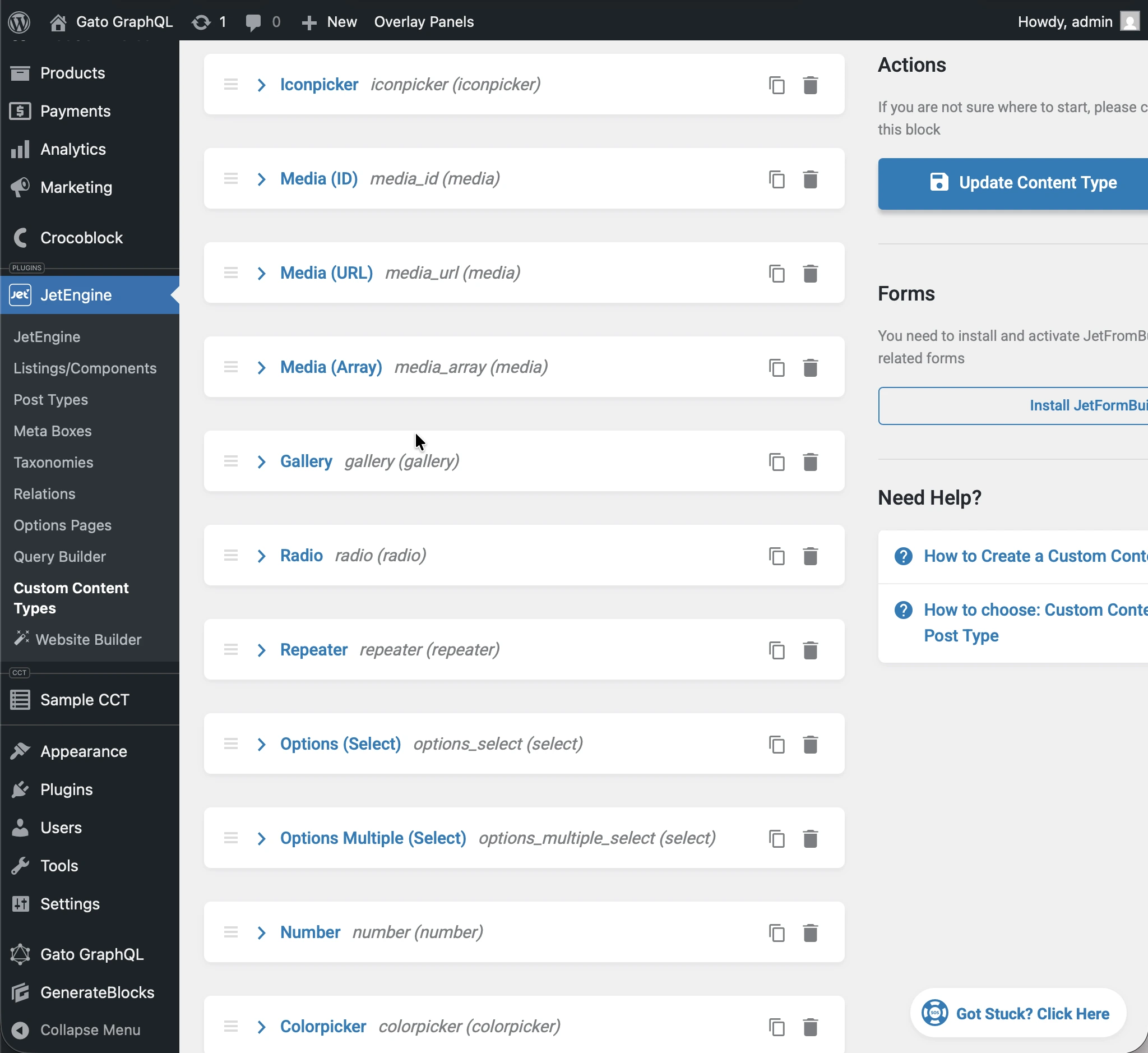
다음 쿼리를 실행하면:
query JetEngineCCTEntries {
jetengineCCTEntry(cctSlug: "sample_cct", by: { id: 1 }) {
label_text: fieldValue(slug: "label_text")
textarea: fieldValue(slug: "textarea")
date: fieldValue(slug: "date")
time: fieldValue(slug: "time")
datetime: fieldValue(slug: "datetime")
wysisyg: fieldValue(slug: "wysisyg")
switcher: fieldValue(slug: "switcher")
checkbox: fieldValue(slug: "checkbox")
checkbox_array: fieldValue(slug: "checkbox_array")
iconpicker: fieldValue(slug: "iconpicker")
media_id: fieldValue(slug: "media_id")
media_url: fieldValue(slug: "media_url")
media_array: fieldValue(slug: "media_array")
gallery: fieldValue(slug: "gallery")
radio: fieldValue(slug: "radio")
repeater: fieldValue(slug: "repeater")
options_select: fieldValue(slug: "options_select")
options_multiple_select: fieldValue(slug: "options_multiple_select")
number: fieldValue(slug: "number")
colorpicker: fieldValue(slug: "colorpicker")
post: fieldValue(slug: "post")
posts: fieldValue(slug: "posts")
}
}...응답의 각 필드는 해당 CCT 타입으로 캐스팅됩니다:
{
"data": {
"jetengineCCTEntry": {
"label_text": "Some label",
"textarea": "Some description here\r\n\r\nSome description there",
"date": "2026-01-24",
"time": "09:13",
"datetime": "2026-03-07T08:00",
"wysisyg": "<p>Some <strong>description</strong> here</p>\n<p><em>Some description</em> there</p>\n<p>Some <a href=\"https://gatoplugins.com\">link</a></p>\n",
"switcher": true,
"checkbox": {
"one": true,
"two": false,
"three": true
},
"checkbox_array": [
"one",
"two"
],
"iconpicker": "fa fa-road",
"media_id": 1362,
"media_url": "https://gatographql.com/wp-content/uploads/GatoGraphQL-logo.webp",
"media_array": {
"id": 1380,
"url": "https://gatographql.com/wp-content/uploads/Funny-Dog.jpg"
},
"gallery": [
1361,
1362,
1363
],
"radio": "1",
"repeater": [
{
"label_(text)": "First item in repeater",
"date": "2026-01-17",
"time": "11:00",
"datetime": "2026-01-16T11:16",
"textarea": "Gato GraphQL provides a multitude of interactive clients,",
"wysiwyg": "<p>Gato GraphQL provides a <strong>multitude of interactive clients</strong>, and a user interface based on the <a href=\"https://wordpress.org\">WordPress editor</a>, so that anybody can operate it, whether a developer or not.</p>\n",
"switcher": true,
"iconpicker": "fa fa-inbox",
"media_id": 1361,
"media_url": "https://gatographql.com/wp-content/uploads/Funny-Dog.jpg",
"media_array": {
"id": 1380,
"url": "https://gatographql.com/wp-content/uploads/Funny-Dog.jpg"
},
"gallery": [
1363,
1361
],
"radio": "two",
"options_select": "three",
"options_multiple_select": [
"two",
"four"
],
"number": 22,
"colorpicker": "#757575",
"post": 1140,
"posts": [
1,
2
]
},
{
"label_(text)": "Second item in repeater",
"date": "2026-01-15",
"time": "00:18",
"datetime": "2026-01-18T00:00",
"textarea": "These clients make it very easy to interact with Gato GraphQL",
"wysiwyg": "<p>These clients <strong>make it very easy to interact with Gato GraphQL</strong>, directly within the <em>wp-admin</em> (and without the need of any PHP code), reducing friction and removing barriers so that anyone (developers and non-developers alike) can use it.</p>\n",
"switcher": false,
"iconpicker": "fa fa-search-plus",
"media_id": 1362,
"media_url": "https://gatographql.com/wp-content/uploads/LICENSE.txt",
"media_array": {
"id": 1363,
"url": "https://gatographql.com/wp-content/uploads/LICENSE.txt"
},
"gallery": [
1380,
1361,
1362
],
"radio": "three",
"options_select": "three",
"options_multiple_select": [
"three"
],
"number": 4469,
"colorpicker": "#2d2270",
"post": 2,
"posts": [
1688,
1682
]
}
],
"options_select": "1",
"options_multiple_select": [
"one",
"two",
"five"
],
"number": 66778899,
"colorpicker": "#721abf",
"post": 1,
"posts": [
1140,
1113
]
}
}
}fieldValues가 반환하는 JSON의 각 필드에도 동일한 타입 캐스팅이 적용됩니다:
query JetEngineCCTEntries {
jetengineCCTEntry(cctSlug: "sample_cct", by: { id: 1 }) {
fieldValues
}
}...이는 다음을 반환합니다:
{
"data": {
"jetengineCCTEntry": {
"fieldValues": {
"label_text": "Some label",
"textarea": "Some description here\r\n\r\nSome description there",
"date": "2026-01-24",
"time": "09:13",
"datetime": "2026-03-07T08:00",
"wysisyg": "<p>Some <strong>description</strong> here</p>\n<p><em>Some description</em> there</p>\n<p>Some <a href=\"https://gatoplugins.com\">link</a></p>\n",
"switcher": true,
"checkbox": {
"one": true,
"two": false,
"three": true
},
"checkbox_array": [
"one",
"two"
],
"iconpicker": "fa fa-road",
"media_id": 1362,
"media_url": "https://gatographql.com/wp-content/uploads/GatoGraphQL-logo.webp",
"media_array": {
"id": 1380,
"url": "https://gatographql.com/wp-content/uploads/Funny-Dog.jpg"
},
"gallery": [
1361,
1362,
1363
],
"radio": "1",
"repeater": [
{
"label_(text)": "First item in repeater",
"date": "2026-01-17",
"time": "11:00",
"datetime": "2026-01-16T11:16",
"textarea": "Gato GraphQL provides a multitude of interactive clients,",
"wysiwyg": "<p>Gato GraphQL provides a <strong>multitude of interactive clients</strong>, and a user interface based on the <a href=\"https://wordpress.org\">WordPress editor</a>, so that anybody can operate it, whether a developer or not.</p>\n",
"switcher": true,
"iconpicker": "fa fa-inbox",
"media_id": 1361,
"media_url": "https://gatographql.com/wp-content/uploads/Funny-Dog.jpg",
"media_array": {
"id": 1380,
"url": "https://gatographql.com/wp-content/uploads/Funny-Dog.jpg"
},
"gallery": [
1363,
1361
],
"radio": "two",
"options_select": "three",
"options_multiple_select": [
"two",
"four"
],
"number": 22,
"colorpicker": "#757575",
"post": 1140,
"posts": [
1,
2
]
},
{
"label_(text)": "Second item in repeater",
"date": "2026-01-15",
"time": "00:18",
"datetime": "2026-01-18T00:00",
"textarea": "These clients make it very easy to interact with Gato GraphQL",
"wysiwyg": "<p>These clients <strong>make it very easy to interact with Gato GraphQL</strong>, directly within the <em>wp-admin</em> (and without the need of any PHP code), reducing friction and removing barriers so that anyone (developers and non-developers alike) can use it.</p>\n",
"switcher": false,
"iconpicker": "fa fa-search-plus",
"media_id": 1362,
"media_url": "https://gatographql.com/wp-content/uploads/LICENSE.txt",
"media_array": {
"id": 1363,
"url": "https://gatographql.com/wp-content/uploads/LICENSE.txt"
},
"gallery": [
1380,
1361,
1362
],
"radio": "three",
"options_select": "three",
"options_multiple_select": [
"three"
],
"number": 4469,
"colorpicker": "#2d2270",
"post": 2,
"posts": [
1688,
1682
]
}
],
"options_select": "1",
"options_multiple_select": [
"one",
"two",
"five"
],
"number": 66778899,
"colorpicker": "#721abf",
"post": 1,
"posts": [
1140,
1113
]
}
}
}
}CCT 접근 권한 부여
기본적으로 쿼리 가능한 CCT는 없습니다.
CCT에 대한 접근을 허용하려면 플러그인 설정에서 CCT를 쿼리 가능으로 설정해야 합니다.
이 설정을 수행할 수 있는 위치는 우선순위 순으로 2곳입니다:
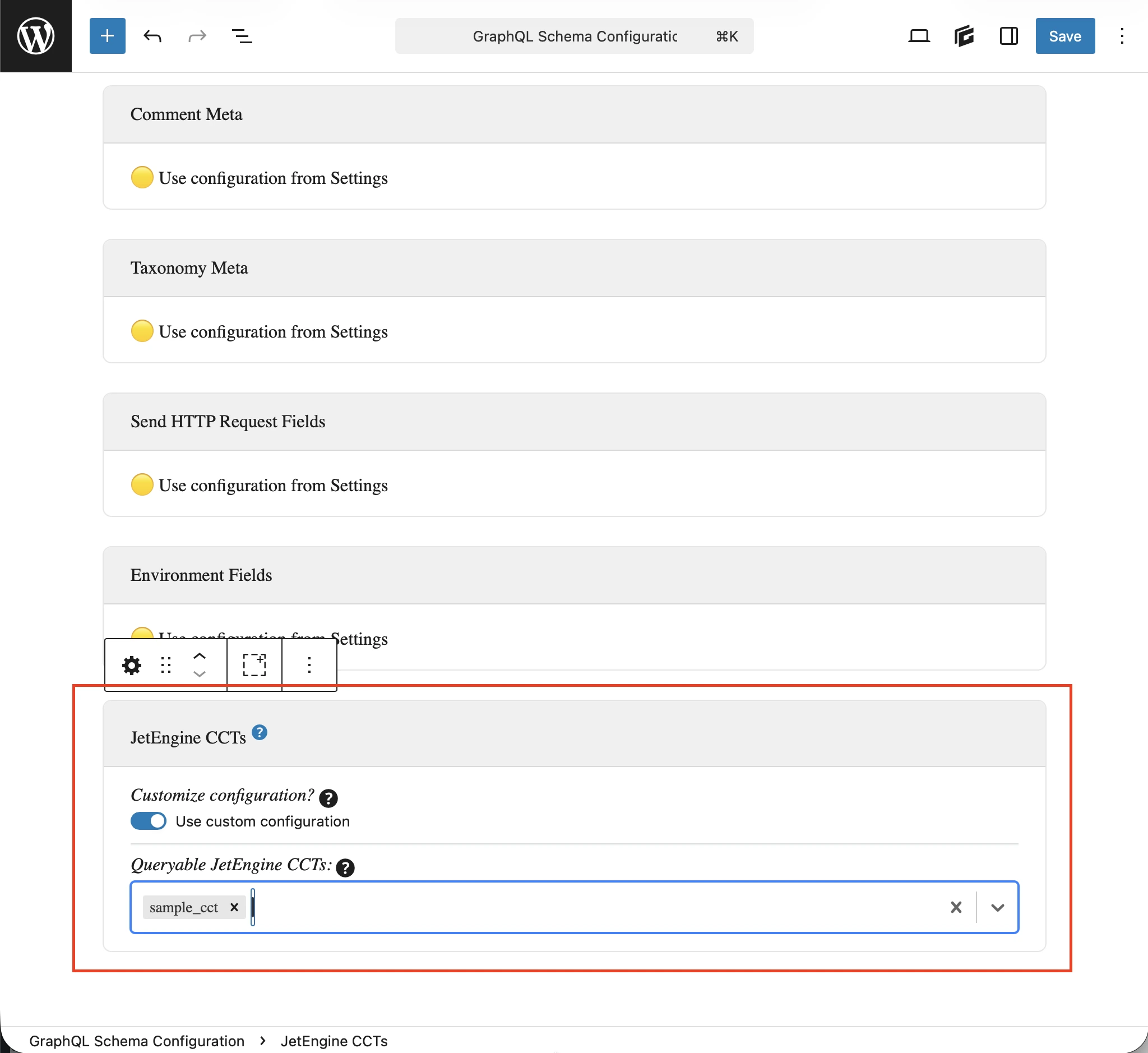
- 커스텀: 해당 스키마 설정에서
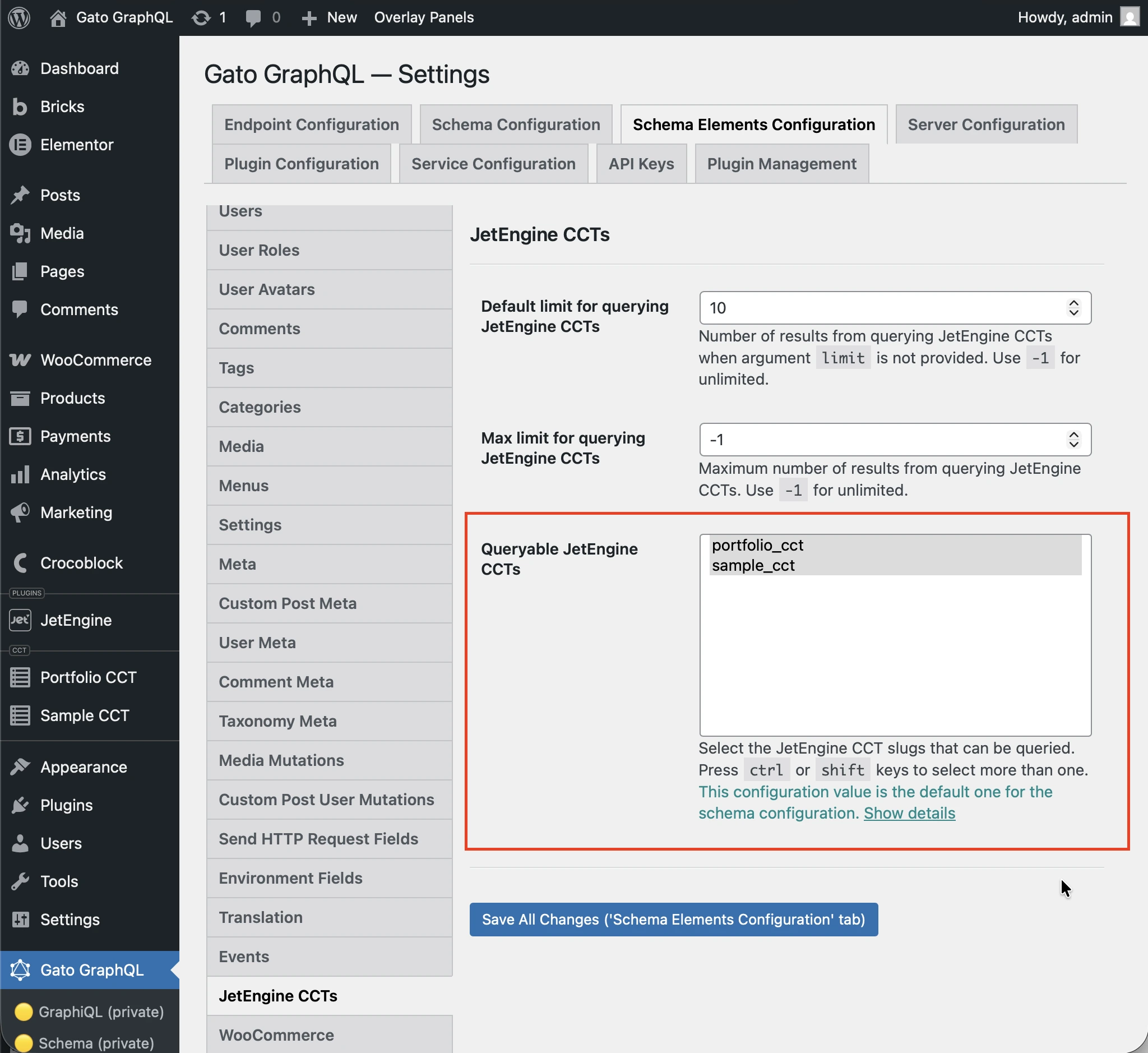
- 일반: 설정 페이지에서
엔드포인트에 적용된 스키마 설정에서 커스텀 설정 사용 옵션을 선택하고 원하는 항목을 입력하세요:
그렇지 않은 경우 설정의 JetEngine CCTS 섹션 아래에 있는 Queryable JetEngine CCTS 옵션에서 정의된 항목이 사용됩니다:
쿼리 예제
CCT 항목 목록:
query {
jetengineCCTEntries(cctSlug: "sample_cct") {
id
uniqueID
cctSlug
status
createdDate
modifiedDate
authorID
author {
id
name
}
singleCustomPostID
singleCustomPost {
id
title
}
fieldValues
someField: fieldValue(slug: "some_field_slug")
}
}슬러그와 ID로 단일 CCT 항목 조회:
query {
jetengineCCTEntry(cctSlug: "sample_cct", by: { id: 1 }) {
id
uniqueID
cctSlug
status
createdDate
modifiedDate
author {
id
name
}
singleCustomPost {
id
title
}
fieldValues
someField: fieldValue(slug: "some_field_slug")
}
}필터, 페이지네이션, 정렬을 사용한 CCT 항목 목록 및 카운트:
query {
jetengineCCTEntryCount(
cctSlug: "sample_cct"
filter: { search: [{ field: "cct_author_id", value: 1, operator: EQUALS }] }
)
jetengineCCTEntries(
cctSlug: "sample_cct"
filter: { search: [{ field: "cct_author_id", value: 1, operator: EQUALS }] }
pagination: { limit: 10, offset: 0 }
sort: { by: "cct_created", order: DESC }
) {
id
authorID
}
}