

Email Sender
글로벌 mutation _sendEmail 로 이메일을 전송합니다.
설명
mutation _sendEmail 은 WordPress의 wp_mail 함수를 실행하여 이메일을 전송합니다. 따라서 WordPress에서 설정된 이메일 전송 구성(사용할 SMTP 제공업체 등)이 사용됩니다.
이메일은 messageAs 입력값에 따라 콘텐츠 유형 "text" 또는 "HTML"로 전송할 수 있습니다(messageAs 는 "oneof" InputObject이므로, 해당 속성 중 하나만 지정할 수 있습니다).
텍스트로 전송하려면 속성 messageAs.text 를 지정하세요.
mutation {
_sendEmail(
input: {
to: "target@email.com"
subject: "Email with text content"
messageAs: {
text: "Hello world!"
}
}
) {
status
errors {
__typename
...on ErrorPayload {
message
}
}
}
}HTML로 전송하려면 속성 messageAs.html 을 지정하세요.
mutation {
_sendEmail(
input: {
to: "target@email.com"
subject: "Email with HTML content"
messageAs: {
html: "<p>Hello world!</p>"
}
}
) {
status
errors {
__typename
...on ErrorPayload {
message
}
}
}
}글로벌 필드
_sendEmail 은 글로벌 필드(더 정확히는 글로벌 mutation)입니다. 즉, Nested Mutations 가 활성화된 경우, 이 mutation은 GraphQL 스키마의 모든 타입(MutationRoot 에 한정되지 않음)에서 실행할 수 있습니다.
이는 사용자 목록을 반복 처리하여 각 사용자에게 이메일을 전송할 때 유용합니다(이 경우, mutation은 User 타입 내에서 트리거됩니다).
mutation {
users {
email
_sendEmail(
input: {
to: $__email
subject: "..."
messageAs: {
text: "..."
}
}
) {
status
errors {
__typename
...on ErrorPayload {
message
}
}
}
}다른 확장 기능(Field to Input 및 PHP Functions via Schema)의 기능과 결합하면 모든 사용자를 위한 개인화된 메시지를 만들 수 있습니다.
mutation {
users {
email
displayName
remainingCredits: metaValue(key: "credits")
emailMessage: _sprintf(
string: """
<p>Hello %s!</p>
<p>Your have <strong>%s remaining credits</strong> in your account.</p>
<p><a href="%s">Buy more?</a></p>
""",
values: [
$__displayName,
$__remainingCredits,
"https://mysite.com/buy-credits"
]
)
_sendEmail(
input: {
to: $__email
subject: "Remaining credits"
messageAs: {
html: $__emailMessage
}
}
) {
status
errors {
__typename
...on ErrorPayload {
message
}
}
}
}
}필요한 권한(capability)
이 mutation은 특정 WordPress 권한(capability)을 가진 사용자만 사용할 수 있도록 제한할 수 있습니다. 이 설정은 설정 페이지의 Plugin Configuration > Email Sender 에서 구성합니다.
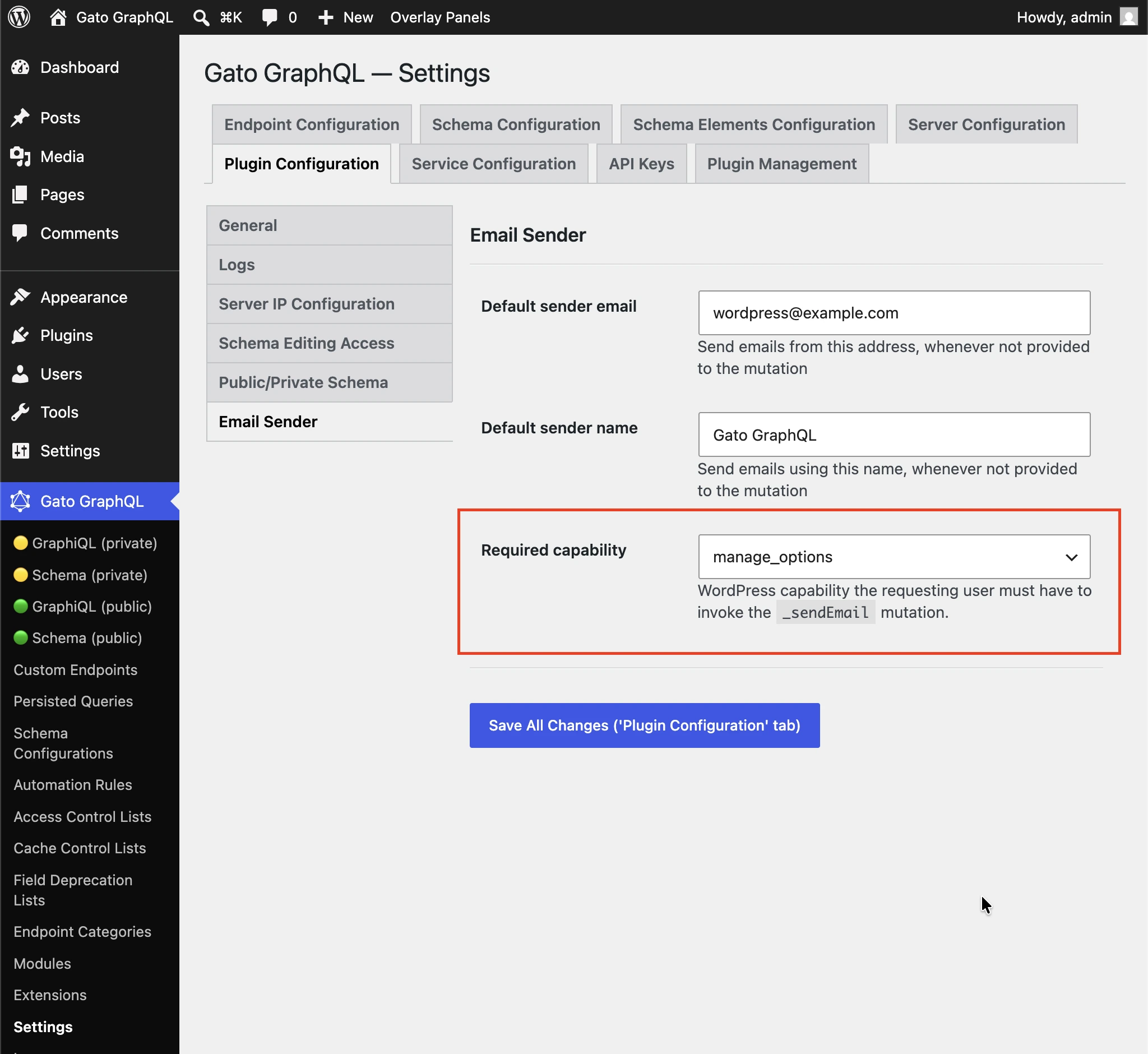
기본값은 manage_options 로 설정되어 있어, 구독자가 이 mutation을 사용하여 임의의 수신자에게 스팸을 전송하지 못하도록 합니다.
(any logged-in user) 를 선택하면 권한 검사를 비활성화할 수 있습니다.
추가 예제
아래 쿼리는 특정 포스트의 콘텐츠를 관리자 사용자에게 이메일로 전송합니다(예: 새 포스트가 게시될 때마다 트리거할 수 있습니다). 다음 확장 기능을 사용합니다.
- Multiple Query Execution — 쿼리를 논리적인 단위로 관리
- Helper Function Collection — Markdown을 사용하여 이메일 메시지를 구성하고
_strConvertMarkdownToHTML로 HTML로 변환 - PHP Functions via Schema —
_strReplaceMultiple및_sprintf필드를 통해 이메일 제목과 메시지에 동적으로 값을 삽입 - Field to Input —
wp_options에서 관리자 이메일 주소를 가져와 제공
query GetPostData($postID: ID!) {
post(by: {id: $postID}) {
title @export(as: "postTitle")
excerpt @export(as: "postExcerpt")
url @export(as: "postLink")
author {
name @export(as: "postAuthorName")
url @export(as: "postAuthorLink")
}
}
}
query GetEmailData @depends(on: "GetPostData") {
emailMessageTemplate: _strConvertMarkdownToHTML(
text: """
There is a new post by [{$postAuthorName}]({$postAuthorLink}):
**{$postTitle}**: {$postExcerpt}
[Read online]({$postLink})
"""
)
emailMessage: _strReplaceMultiple(
search: ["{$postAuthorName}", "{$postAuthorLink}", "{$postTitle}", "{$postExcerpt}", "{$postLink}"],
replaceWith: [$postAuthorName, $postAuthorLink, $postTitle, $postExcerpt, $postLink],
in: $__emailMessageTemplate
)
@export(as: "emailMessage")
subject: _sprintf(string: "New post created by %s", values: [$postAuthorName])
@export(as: "emailSubject")
}
mutation SendEmail @depends(on: "GetEmailData") {
adminEmail: optionValue(name: "admin_email")
_sendEmail(
input: {
to: $__adminEmail
subject: $emailSubject
messageAs: {
html: $emailMessage
}
}
) {
status
}
}