

Internal GraphQL Server
이 확장 기능은 내부 GraphQL 서버를 설치하며, PHP 코드를 사용하여 애플리케이션 내에서 호출할 수 있습니다.
주요 사용 사례로는, 어떤 액션이 발생했을 때 GraphQL 쿼리 실행을 트리거하여 관련 작업(알림 전송, 로그 항목 추가, 조건 검증 등)을 수행할 수 있습니다.
설명
내부 GraphQL 서버는 클래스 GatoGraphQL\InternalGraphQLServer\GraphQLServer를 통해 접근하며, 다음 세 가지 메서드를 사용합니다.
executeQuery: GraphQL 쿼리를 실행합니다executeQueryInFile: (.gql) 파일에 포함된 GraphQL 쿼리를 실행합니다executePersistedQuery: 영속화된 GraphQL 쿼리를 실행합니다 (ID를 int로, 또는 슬러그를 string으로 지정) (Persisted Queries 확장 기능이 필요합니다)
메서드 시그니처는 다음과 같습니다.
namespace GatoGraphQL\InternalGraphQLServer;
use PoP\Root\HttpFoundation\Response;
class GraphQLServer {
/**
* Execute a GraphQL query
*/
public static function executeQuery(
string $query,
array $variables = [],
?string $operationName = null,
int|string|null $schemaConfigurationIDOrSlug = null,
): Response {
// ...
}
/**
* Execute a GraphQL query contained in a (`.gql`) file
*/
public static function executeQueryInFile(
string $file,
array $variables = [],
?string $operationName = null,
int|string|null $schemaConfigurationIDOrSlug = null,
): Response {
// ...
}
/**
* Execute a persisted GraphQL query (providing its object
* of type WP_Post, ID as an int, or slug as a string)
*/
public static function executePersistedQuery(
WP_Post|string|int $persistedQuery,
array $variables = [],
?string $operationName = null
): Response {
// ...
}
}GraphQL 쿼리를 실행하고 응답 내용을 가져오려면 다음과 같이 합니다.
// Provide the GraphQL query
$query = "{ ... }";
// Execute the query against the internal server
$response = GraphQLServer::executeQuery($query);
// Get the content and decode it
$responseContent = json_decode($response->getContent(), true);
// Access the data and errors from the response
$responseData = $responseContent["data"] ?? [];
$responseErrors = $responseContent["errors"] ?? [];Response 객체에는 생성된 헤더도 포함됩니다 (예: Cache Control List가 적용된 경우 Cache-Control 헤더가 추가됩니다).
$responseHeaders = $response->getHeaders();
$responseCacheControlHeader = $response->getHeaderLine('Cache-Control');클래스 GraphQLServer는 WordPress 코어의 init 훅 이전에는 사용할 수 없다는 점에 주의하세요.
스키마 설정
내부 GraphQL 서버는 자체 스키마 설정을 적용합니다. 예를 들어, 기본 설정은 설정 페이지의 "Internal GraphQL Server" 탭에서 선택할 수 있습니다.
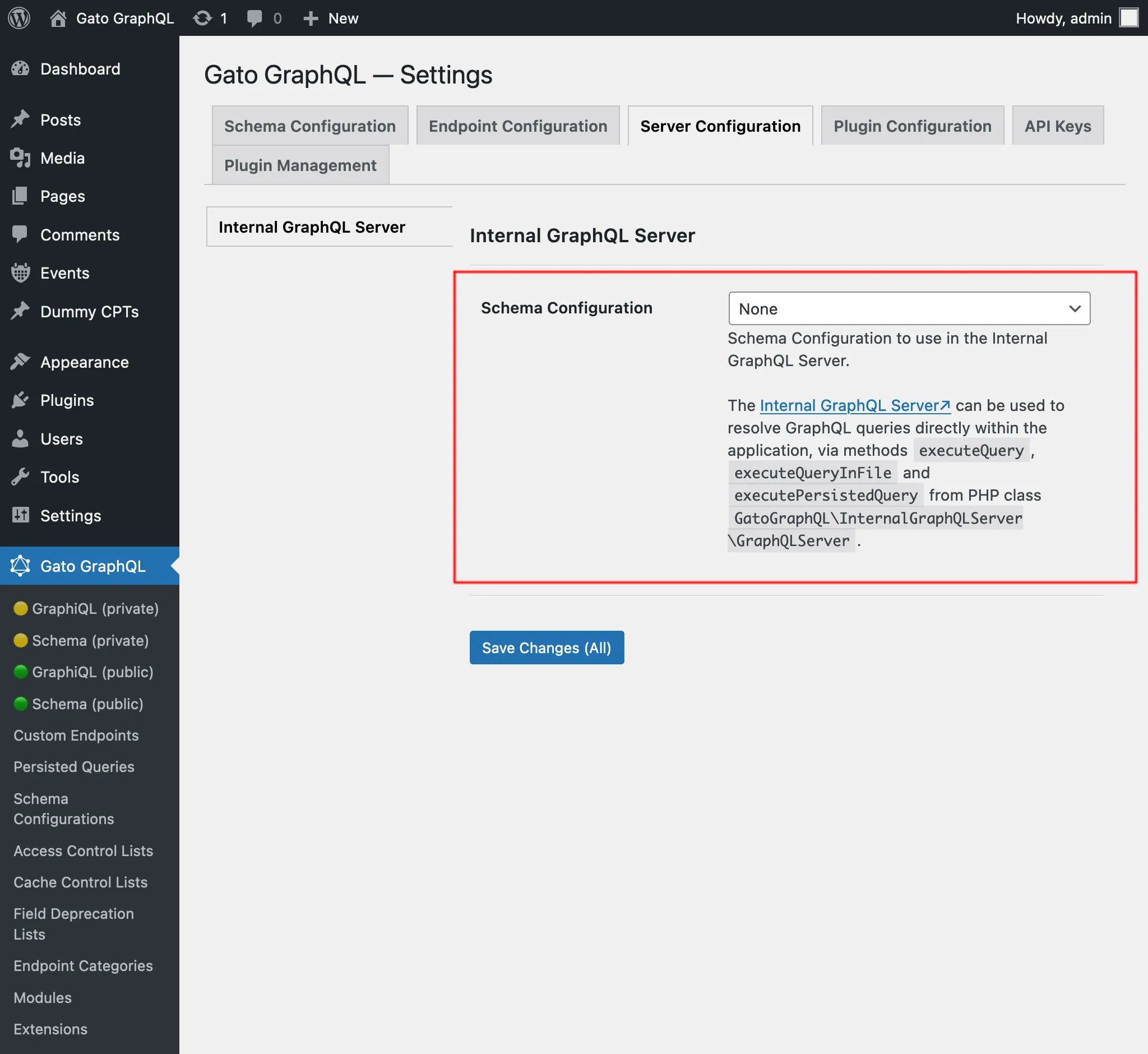
이 설정은 내부 GraphQL 서버에 대해 실행되는 쿼리가, 다른 설정의 엔드포인트(공개 엔드포인트 graphql/ 등)에서 처리 중인 다른 GraphQL 쿼리에 의해 트리거된 경우에도 적용됩니다.
예를 들어, 싱글 엔드포인트 graphql/에 IP 기반 사용자 검증을 위한 접근 제어 목록을 설정하고, 이 엔드포인트에 대해 뮤테이션 createPost를 실행한다고 가정해 보겠습니다.
mutation {
createPost(input: {...}) {
# ...
}
}이 경우, 해당 IP의 방문자만 이 뮤테이션을 실행할 수 있습니다.
그런 다음, publish_post에 훅을 설정하여 내부 GraphQL 서버에 대해 쿼리를 실행한다고 가정해 보겠습니다 (예: 사이트 관리자에게 알림을 전송하기 위해).
add_action(
"publish_post",
fn (int $post_id) => GraphQLServer::executeQuery("...", ["postID" => $post_id])
);이 GraphQL 쿼리는 내부 GraphQL 서버에 적용된 스키마 설정을 사용하여 처리되며, 싱글 엔드포인트 graphql/의 설정은 사용되지 않습니다.
결과적으로, 사용자 IP 검증은 수행되지 않습니다 (해당 접근 제어 목록이 내부 GraphQL 서버에도 적용되어 있지 않는 한).
문제 디버깅
쿼리 실행을 추적하려면 로그를 확인하세요.
자세한 내용은 문제 해결을 참고하세요.
예시
이 워크플로 예시(Multiple Query Execution, Helper Function Collection, Field to Input 모듈도 사용)에서는 사이트에 새 게시물이 생성될 때 관리자 사용자에게 알림을 전송합니다.
WordPress 코어 액션 new_to_publish에 훅을 설정하고, 새로 생성된 게시물의 데이터를 가져와 GraphQLServer::executeQuery를 호출합니다.
add_action(
'new_to_publish',
function (WP_Post $post) {
if ($post->post_type !== 'post') {
return;
}
// Check the contents of the query below
$query = ' ... ';
$variables = [
'postTitle' => $post->post_title,
'postContent' => $post->post_content,
]
GraphQLServer::executeQuery($query, $variables, 'SendEmail');
}
);...다음 GraphQL 쿼리와 함께 사용합니다.
query GetEmailData(
$postTitle: String!,
$postContent: String!
) {
emailMessageTemplate: _strConvertMarkdownToHTML(
text: """
There is a new post on the site:
**{$postTitle}**:
{$postContent}
"""
)
emailMessage: _strReplaceMultiple(
search: ["{$postTitle}", "{$postContent}"],
replaceWith: [$postTitle, $postContent],
in: $__emailMessageTemplate
)
@export(as: "emailMessage")
}
mutation SendEmail @depends(on: "GetEmailData") {
_sendEmail(
input: {
to: "admin@site.com"
subject: "There is a new post"
messageAs: {
html: $emailMessage
}
}
) {
status
}
}